

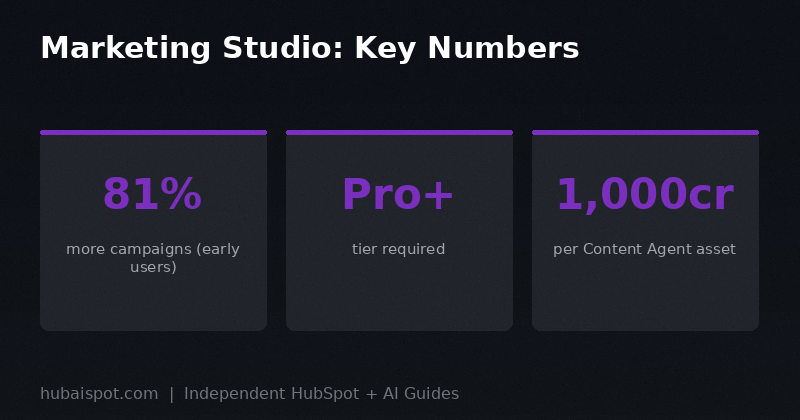
HubSpot’s Fall 2026 Spotlight introduced Marketing Studio as the rebuilt version of the marketing workspace inside Marketing Hub. The headline statistic from the launch was that early customers using Marketing Studio were creating 81% more campaigns.
That’s the kind of number that sounds impressive until you think about it for a few seconds. More campaigns isn’t automatically better. A team creating 10 solid campaigns a year might produce better results than one creating 18 mediocre ones built by an AI that didn’t know enough about the business.
So what does Marketing Studio actually do, who benefits from it, and what does that 81% stat actually represent?
What Marketing Studio Is
Marketing Studio is HubSpot’s attempt to unify the marketing workflow into a single workspace where insights, campaign creation, content production, and performance reporting all connect together.
Before Marketing Studio, the Marketing Hub workflow was fragmented. You’d check your analytics in one place, draft emails in another, manage social in another, build landing pages somewhere else. The tools shared data but required you to manually connect insights to actions.
Marketing Studio’s goal is to close that loop. The workspace shows you what’s performing and underperforming, and from the same screen, you can start a Breeze Assistant conversation to address it. See that a particular segment has low email open rates? Ask Breeze to suggest new subject line approaches for that segment, create a test variant, and schedule it — all without navigating to a different part of the platform.
The 81% more campaigns figure likely reflects how much faster it is to go from identifying an opportunity to launching something. If you used to need 15 minutes of navigation to set up a new campaign and now it takes 3, you’re going to run more experiments.
What’s Inside Marketing Studio
The Unified Campaign Canvas
The core of Marketing Studio is a campaign canvas that shows all your active and planned campaigns alongside their key metrics. This is the command center — you can see open rates, click rates, pipeline influenced, and conversion data for each campaign without clicking into them individually.
From this view, you can also see which campaigns have assets in draft, which are live, and which are underperforming against benchmarks. HubSpot surfaces the underperformers automatically and flags them for attention.
This is genuinely useful for marketing managers doing weekly performance reviews. Having everything in one view instead of clicking through individual campaign records saves time and reduces the chance that something falls through the cracks.
Campaign Agent
Campaign Agent is the AI feature that generates a full campaign plan from a brief. You describe the campaign goal — “we’re launching a new product tier for mid-market companies in Q4 and want to generate 50 demos” — and Campaign Agent drafts a campaign structure: which channels to use, suggested timeline, proposed email sequence, content recommendations, and audience targeting suggestions.
This is a starting point, not a finished plan. What Campaign Agent produces is a reasonable first draft of a campaign structure that your team then reviews, adjusts, and executes. The value is in the speed of getting from blank page to first draft, not in replacing the strategic thinking.
Campaign Agent is available through Breeze Assistant rather than as a separate tool. You access it by starting a Breeze conversation and selecting Campaign as the task type.
Important pricing note: Campaign Agent itself doesn’t consume credits to generate the plan. Where credits come in is if you approve the creation of actual assets — emails, landing pages, social posts — using Content Agent. Each asset created through Content Agent costs 1,000 credits (roughly $10).
Content Agent
Content Agent is the feature that creates actual content assets. Blog posts, emails, landing pages, social posts — Content Agent can draft these using your Context Home information, your CRM data, and the campaign brief you’ve defined.
The output quality depends heavily on how well you’ve set up Context Home. With good brand voice and product context defined, Content Agent produces drafts that are on-brand and factually accurate about your products. Without that context, it produces generic content that could have been written for any company in your space.
Content Agent is also where the 1,000-credit-per-asset cost applies. Teams using Content Agent for high-volume content production need to budget for this. At $10 per asset, creating a full content library through Content Agent alone would get expensive quickly.
The right use case is draft acceleration: Content Agent handles the first draft, your team refines it. Not Content Agent as a complete content production pipeline with no human editing.
Nurture Agent
Nurture Agent automates the continuation of the buyer journey after initial engagement. If someone downloads a gated asset, Nurture Agent can draft and schedule a follow-up email sequence personalized to the content they engaged with and their profile in your CRM.
This is one of the more practically useful agent features in Marketing Studio because it addresses a common failure mode: marketing teams generate leads, marketing-to-sales handoff is slow, and leads go cold before anyone follows up. Nurture Agent can operate in the gap.
The catch is setup. Nurture Agent needs clear rules about when to act, what content to use, and when to escalate to a human. Without those guardrails, it will run sequences on contacts who’ve already been contacted by sales, or who fall outside your ICP. Configure it carefully before enabling it at scale.
Cross-Campaign Attribution
One of Marketing Studio’s substantive improvements over the previous marketing reporting experience is attribution visibility. You can now see pipeline influenced and revenue attributed across campaigns in a single view, with multi-touch attribution rather than last-touch only.
This matters because last-touch attribution consistently undervalues content that drives awareness and consideration. A blog post that introduces someone to your brand doesn’t get credit for the deal that closes two months later if your attribution is last-touch. Marketing Studio’s cross-campaign attribution starts to surface those relationships.
For teams that have been fighting for marketing budget without clean data to show pipeline influence, this is a useful reporting upgrade.
Which Tier You Need
Marketing Studio is available on Marketing Hub Professional and Enterprise. It’s not available on Starter.
This is worth noting because HubSpot has been expanding what’s available on Starter across recent product cycles. Marketing Studio stayed at Professional and above, which means the full AI campaign management experience requires at least a Professional subscription.
Agent Hub, which hosts Campaign Agent and Nurture Agent, is also included in Professional and Enterprise. The core credits allotment for moderate AI usage is included in those tiers, with additional credits available for purchase.
If you’re on Starter and evaluating whether to upgrade for Marketing Studio access, the honest assessment is: the platform features at Starter are solid for small teams, but the AI campaign management workflow requires Professional. The upgrade cost needs to be weighed against what your team’s time is currently worth for campaign planning and content creation.
What the 81% More Campaigns Stat Is Actually Measuring
HubSpot published this figure citing early Marketing Studio customers. “81% more campaigns” compared to what, exactly? Compared to the same teams’ campaign output before Marketing Studio.
The most likely explanation is that Marketing Studio makes it faster to spin up a campaign, so teams that would have created 10 campaigns in a quarter now create 18. That’s real output. Whether those 18 campaigns collectively produce more pipeline than the original 10 depends on the quality of the AI inputs, the strategy behind the campaigns, and the audience quality — none of which Marketing Studio controls.
The 81% figure is a measure of output velocity, not outcome quality. It’s worth taking seriously as evidence that the platform reduces friction in campaign creation. It shouldn’t be taken as evidence that your marketing results will improve by 81%.
The teams that will see the best outcomes from Marketing Studio are those that use the increased output speed for genuine experimentation: more A/B tests, more segment-specific variants, more channel diversification. Teams that use it to create more volume of the same campaign type will get marginal gains at best.
How Marketing Studio Compares to Building Campaigns in Breeze Copilot Before
Before Marketing Studio, a lot of HubSpot users were accessing AI assistance through Breeze Copilot in the sidebar. Copilot was useful for answering questions about your data and drafting individual pieces of content, but it couldn’t initiate multi-step campaign creation.
Marketing Studio centralizes and expands what was previously scattered across Copilot, individual agent pages, and the campaign creation flow. The difference isn’t so much new capability as it is a coherent workflow that connects capabilities you already had.
If you were a power user of the old Breeze Copilot, you’ll find Marketing Studio familiar but more capable. If you weren’t using Breeze Copilot much, Marketing Studio is a better starting point than Copilot was — the workflow is clearer and the agent integrations are more complete.
For the detailed Breeze vs. standalone AI tools comparison, the Breeze AI vs ChatGPT article is worth reading before you decide how much of your content creation workflow to shift into Marketing Studio.
The Setup Work That Determines Whether This Works for You
Marketing Studio is the tool. These are the conditions that determine whether it produces good results:
Context Home configured properly. Every AI feature in Marketing Studio draws from Context Home for brand voice, product context, and ICP information. If Context Home is empty or vague, Marketing Studio produces generic content at higher volume. That’s worse than low-volume content your team wrote.
Clean CRM data. Campaign audience suggestions and personalization pull from your contact and deal records. Dirty data means poorly targeted campaigns.
Clear campaign briefs. Campaign Agent works from what you tell it. Vague briefs produce vague plans. Spend five minutes writing a tight campaign brief before invoking Campaign Agent and the output quality improves substantially.
Credit budget allocated. Before your team starts using Content Agent for campaign assets, set credit limits in AI Settings and brief your team on what costs credits. The unpleasant surprise of a large credits bill after a productive day of content creation is avoidable.
Marketing Studio is worth exploring if you’re on Professional or Enterprise and your team currently spends significant time on the mechanical work of campaign setup. The time savings are real. But the outcomes depend on the strategic inputs you bring, not on the platform’s ability to substitute for them.
HubAISpot covers independent, practical guides on HubSpot and AI for marketers and sales teams. No vendor relationships. No paid placements.
Leave a Reply