
Every HubSpot user eventually hits the same wall.
You’ve got Breeze AI built right into your platform. You’ve got ChatGPT open in another tab. And you’re spending more time deciding which tool to use than actually writing the copy.
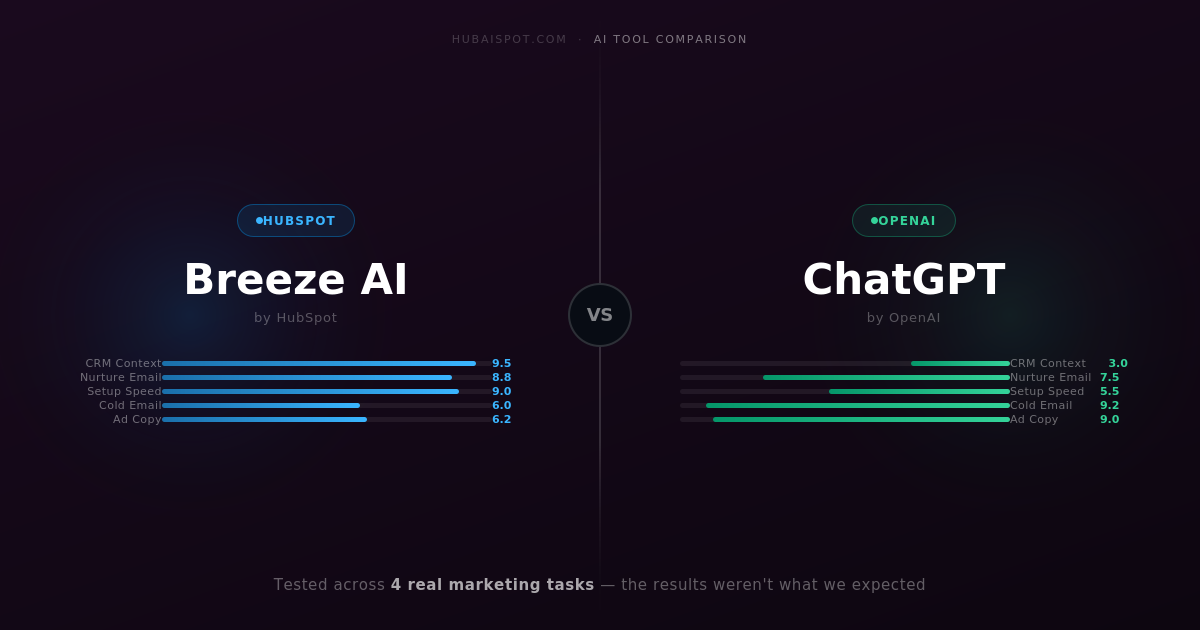
This comparison cuts through that. I tested both tools across four real marketing tasks that most HubSpot users deal with weekly — email sequences, blog outlines, ad copy, and follow-up messages. The goal wasn’t to crown a winner on paper. It was to figure out which one actually moves faster inside a real marketing workflow.
Here’s what I found.
What Is HubSpot Breeze AI?
Breeze AI is HubSpot’s native AI layer, embedded directly across Marketing Hub, Content Hub, and Sales Hub. It’s not a single tool — it’s a collection of AI features that live inside your existing HubSpot workflows.
The main components relevant to marketing copy are:
- Content Assistant — generates and rewrites copy inside the email editor, landing page builder, and blog editor
- Breeze Copilot — a chat-based AI assistant that works across your HubSpot portal, with access to your CRM data
- AI Blog Writer — builds full draft posts based on a topic and outline
The core selling point is context. Breeze AI knows who your contacts are, what stage they’re in, and what your brand sounds like — at least in theory.
What Is ChatGPT (in a Marketing Context)?
ChatGPT needs no introduction, but its role in a HubSpot workflow is worth clarifying. Most marketers use it as a standalone writing assistant — they describe a task in a prompt, get output, then paste it into HubSpot manually.
With the right prompt engineering, ChatGPT (particularly GPT-4o) produces remarkably strong marketing copy. It has no access to your CRM, your contact list, or your brand unless you feed that context in yourself. That’s both its weakness and, sometimes, its strength.
Breeze AI vs ChatGPT: Quick Comparison
| HubSpot Breeze AI | ChatGPT (GPT-4o) | |
|---|---|---|
| Price | Included with HubSpot paid plans | $20/month (Plus) |
| CRM Context | Native — reads your contacts, deals, and activity | None — you feed context manually |
| Best for | Nurture emails, sequences, CRM-connected copy | Cold outreach, ad copy, long-form content |
| Brand Voice | Learns from your HubSpot content | Requires manual examples in prompt |
| Setup time | Zero — lives inside HubSpot | Instant, but prompt engineering required |
| Output quality | Solid for contextual tasks | Higher ceiling with the right prompt |
| Works without HubSpot | No | Yes |
| Verdict | Win: context-heavy campaigns | Win: creative quality and control |
The Four Tests
Test 1: Cold Email Sequence (5-Step)
The task: Write a 5-email cold outreach sequence targeting operations managers at mid-size SaaS companies, promoting a CRM audit service.
Breeze AI: Inside HubSpot’s sequence editor, I used the AI generation feature to create each email individually. The output was clean and professional, but generic. It defaulted to safe, mid-tone business language that felt like every other cold email hitting inboxes right now. The personalization tokens worked well — pulling first name and company — but the actual copy didn’t have an edge.
ChatGPT: I fed it a detailed prompt with the ICP, the service description, the desired tone (direct, no fluff), and asked for all five emails in one shot. The result was sharper. Email #1 led with a specific pain point. Email #3 used a reframe that actually made me want to read it. The subject lines had more variety.
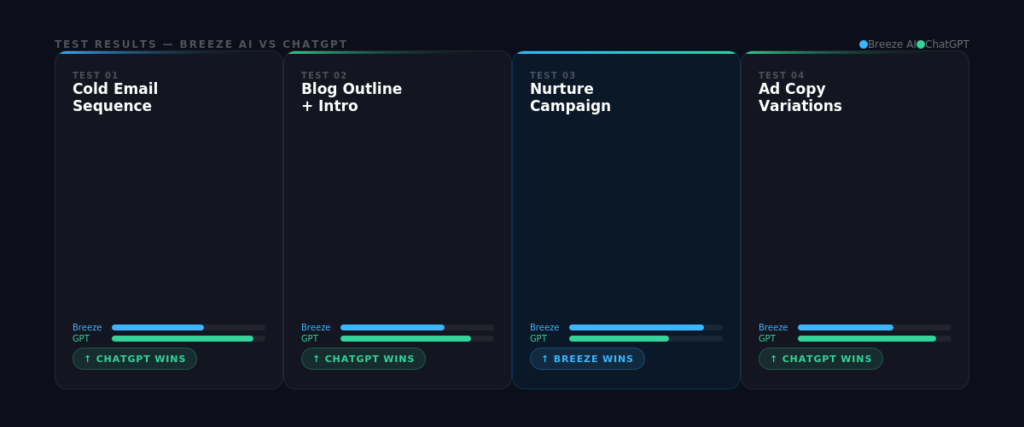
Winner: ChatGPT — for cold email, where every word needs to earn its place, the extra prompt control makes a real difference.
The Exact Prompts We Used
To keep the comparison honest, here are the actual prompts given to each tool for the cold email test. The task was a 5-step sequence targeting operations managers at mid-size SaaS companies.
Prompt given to Breeze AI Content Assistant:
“Write a cold outreach email targeting an operations manager at a SaaS company with 50–200 employees. The offer is a CRM audit service. Tone: direct and professional.”
Breeze generated a competent email in about 8 seconds. The subject line was “Streamline Your CRM Today” — functional, but not something that stops a busy ops manager mid-scroll. The body opened with “I hope this message finds you well,” which is the single fastest way to get deleted.
Prompt given to ChatGPT (GPT-4o):
“You’re writing a cold email sequence — 5 emails total — targeting operations managers at SaaS companies with 50–200 employees. The offer is a CRM audit: we review their HubSpot setup and find inefficiencies costing them pipeline. Tone: direct, no corporate filler, write like a real person. Lead with their pain, not our service. Subject lines should feel like they came from a colleague, not a marketer. No ‘I hope this finds you well.’ Go.”
The difference in output was immediate. Email 1 opened with: “Most HubSpot setups I audit have the same three problems — and none of them show up in the dashboard.” Subject line: “Quick question about your CRM.” Email 3 used a reframe: “You don’t have a lead problem. You have a follow-up problem.”
The gap wasn’t the AI — it was the prompt. Breeze’s interface doesn’t invite that level of instruction, and most users won’t think to push it. ChatGPT’s blank canvas forces you to be specific, which ultimately produces sharper output.
The takeaway: If you invest the same prompt effort into both tools, the quality gap narrows. But Breeze’s UX doesn’t nudge you toward better prompts. ChatGPT’s does.
Test 2: Blog Post Outline + Introduction
The task: Create an outline and opening section for a post titled “How AI is Changing Lead Scoring in HubSpot.”
Breeze AI: The AI Blog Writer produced a solid eight-section outline in about 20 seconds, directly inside the HubSpot editor. It was logical and well-structured. The auto-generated introduction was readable but opened with “In today’s fast-paced world of marketing…” — a phrase that should be retired permanently.
ChatGPT: With a prompt that specified “no clichés, lead with a hook, write for a practitioner audience,” it generated an outline with stronger section angles and an opening paragraph that started mid-thought, creating immediate momentum. The structure was almost identical to Breeze’s, but the execution was better.
Winner: ChatGPT — again, prompt control wins. That said, Breeze’s speed advantage inside the editor is real. If you’re outlining ten posts a month, the friction savings matter.
Test 3: Marketing Email (Nurture Campaign)
The task: Write a nurture email for contacts who downloaded a lead magnet about HubSpot onboarding, sending them toward a free audit offer.
Breeze AI: This is where Breeze started pulling ahead. Because it had access to the contact list segment and the form submission data, it could reference the lead magnet directly without me typing any of that context. The email it generated was on-topic, appropriately timed in tone (not too salesy for a nurture), and required minimal editing.
ChatGPT: I had to manually describe the lead magnet, the segment, the offer, and the tone. The output was good — arguably better copy — but the setup time ate into the advantage. If I’m doing this for one email, fine. If I’m producing 20 nurture emails a month, that manual context loading adds up.
Winner: Breeze AI — when you’re writing connected to live CRM data, Breeze’s context awareness is genuinely valuable. This is exactly what it was built for.
Test 4: Ad Copy Variations (Google + LinkedIn)
The task: Generate five headline and description combinations for a Google Search ad and three LinkedIn sponsored post copy variants promoting a HubSpot implementation service.
Breeze AI: Breeze’s ad copy generation is available inside Marketing Hub’s ad management section. The headlines were competent but formulaic. The LinkedIn copy was too long for the format and read like a blog excerpt rather than a scroll-stopping sponsored post.
ChatGPT: With a prompt specifying character limits, platform context, and desired emotional hook, it produced tighter, more varied output. The LinkedIn variants in particular had distinct angles rather than just rewording the same message three times.
Winner: ChatGPT — for paid copy where you’re A/B testing and need genuine variation, the prompt flexibility wins.
The Real Difference: Context vs. Control
After running all four tests, the pattern is clear.
Breeze AI wins when the work is already connected to your HubSpot data. Nurture emails, follow-up sequences for existing contacts, re-engagement campaigns — anything where the AI benefits from knowing who you’re talking to, what they’ve done, and where they are in the funnel. In those cases, Breeze saves real time because you’re not feeding it context manually.
ChatGPT wins when copy quality and creative control matter more than speed. Cold outreach, ad copy, content with a distinctive voice, anything that needs to stand out — ChatGPT with a well-crafted prompt consistently produces sharper output.
The mistake most HubSpot users make is treating this as an either/or decision. It isn’t. The smarter workflow is using both:
- Use ChatGPT to create high-quality templates, frameworks, and hero content
- Use Breeze AI to personalize, adapt, and deploy that content at scale inside HubSpot
That combination outperforms either tool used alone.
What About HubSpot Breeze Copilot?
Breeze Copilot — the chat interface inside HubSpot — deserves a separate mention. It’s less a copywriter and more a CRM assistant. Ask it to summarize a contact’s history, pull a list of deals stuck in a particular stage, or draft a quick follow-up based on a contact’s last activity, and it performs well.
For writing tasks though, it’s slower and less capable than either the Content Assistant or ChatGPT. Think of it as your HubSpot navigator, not your copywriter.
Pricing Reality Check
This matters for how you decide to use these tools.
HubSpot Breeze AI is included with paid HubSpot plans, but the depth of features depends on your tier. Starter plans get basic AI generation. Professional and Enterprise tiers unlock the full Breeze suite including Copilot and advanced automation. If you’re already paying for HubSpot Professional, Breeze is essentially free to use.
ChatGPT Plus costs $20/month for GPT-4o access. For any serious marketing use case, the free tier isn’t sufficient — the output quality gap between GPT-3.5 and GPT-4o is significant. If your team has three people using it, that’s $60/month for a tool that will materially improve your copy output.
Most marketing teams running HubSpot should have both. The combined cost is trivial relative to the time saved.
Bottom Line
If you had to pick just one, the answer depends on how you use HubSpot.
If most of your copywriting work happens inside HubSpot — nurture flows, sequences, contact-based campaigns — lean on Breeze AI and invest time learning its prompting. The context integration is a genuine differentiator that ChatGPT can’t replicate without manual setup.
If you’re doing outbound work, content creation, or anything that needs real creative punch — ChatGPT with a strong prompt framework will consistently outperform Breeze on raw output quality.
The best-performing HubSpot teams in 2026 aren’t debating which AI to use. They’re building workflows where both tools play to their strengths.
Want the exact prompts I used in these tests? Check out 25 HubSpot AI Prompts That Make Marketing Work Faster — copy-paste ready for both Breeze and ChatGPT.
Leave a Reply