
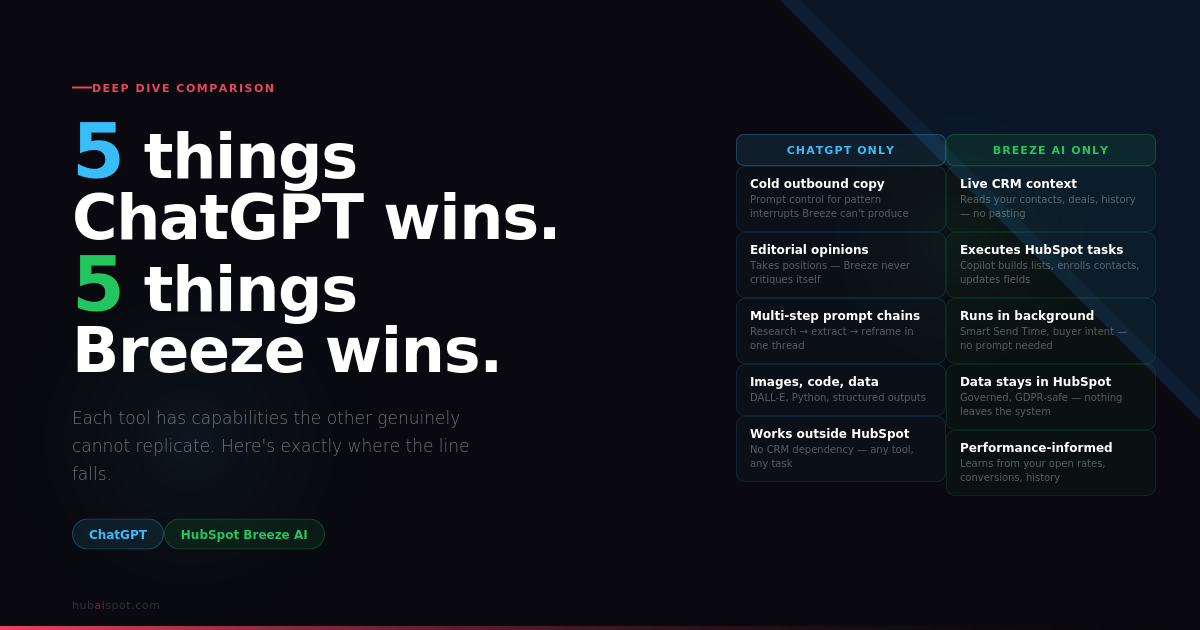
The ChatGPT vs HubSpot Breeze AI debate usually gets framed as a competition. It isn’t.
These tools were built for fundamentally different purposes, and the teams getting the most out of both aren’t choosing between them — they’re using each one for the tasks it was designed to handle. The problem is most HubSpot users don’t know where that line falls. They either try to do everything in Breeze (and wonder why the output feels generic) or they do everything in ChatGPT (and manually paste content into HubSpot all day like it’s 2021).
This article draws the line clearly. Five things ChatGPT does that Breeze genuinely cannot. Five things Breeze does that ChatGPT genuinely cannot. No hedging.
If you want the full head-to-head tested across four real marketing tasks, that’s covered in the HubSpot Breeze AI vs ChatGPT comparison. This article goes a level deeper — the specific capabilities that make each tool irreplaceable rather than interchangeable.
5 Things ChatGPT Can Do That HubSpot Breeze Can’t
1. Write Cold Outbound Copy That Actually Converts
Breeze AI was built for inbound. Its content generation lives inside an email editor connected to a warm contact database, nurture workflows, and CRM history. The underlying assumption baked into every Breeze output is that the person receiving the email already knows you exist.
Cold outbound requires a completely different set of instincts. The opening line has to stop a stranger mid-scroll. The subject line has to feel like it came from a colleague, not a marketing platform. The follow-up has to reframe the problem rather than repeat the pitch.
ChatGPT — with a well-structured prompt — understands the mechanics of cold outreach in a way Breeze doesn’t. Tell it the persona, the pain point, the tone, and the constraint (“under 80 words, no ‘I hope this finds you well’, lead with their problem not your solution”), and it produces drafts that require actual editorial attention rather than a complete rewrite.
Breeze’s cold email output consistently defaults to safe, mid-tone business language. Functional. Forgettable. That’s a structural limitation — Breeze was trained on warm marketing content, and it shows.
For copy-paste prompts that pull the best out of ChatGPT for cold outbound inside HubSpot sequences, the 25 HubSpot AI Prompts guide has the templates.
2. Take a Position and Argue It
This one matters more than it sounds.
Good content marketing requires opinions. Not balanced, hedge-everything explainers — actual points of view that a reader can agree or disagree with. “HubSpot’s lead scoring is broken for most teams and here’s why” is more useful and more rankable than “HubSpot’s lead scoring has both advantages and limitations.”
ChatGPT can be instructed to take a position and defend it. Tell it “write this as if you’re a skeptical practitioner who’s seen these features overpromised” and it will. The output has edge. It says things HubSpot’s own blog won’t say.
Breeze averages toward the mean. It generates content that won’t offend anyone, which means it also won’t resonate with anyone. It’s constitutionally incapable of saying “this feature is overrated” because it’s built by the company selling the feature.
The honest Breeze AI assessment in our 30-day review was written with ChatGPT drafts as the starting point precisely because Breeze would never produce something that critical of itself.
3. Adapt to Complex, Multi-Step Prompt Chains
A prompt chain is a sequence of related prompts where each output feeds the next. Research a topic → extract the three most common objections → write a rebuttal for each → combine into a battle card. Or: analyse this company’s LinkedIn posts → identify their content angle → write a cold email that references it specifically.
ChatGPT handles prompt chains naturally. You can build a sophisticated research-to-output workflow in a single conversation, iterate on each step, and get to a genuinely polished result.
Breeze is a single-shot generator. You give it a brief, it produces output, you edit or regenerate. There’s no conversation thread, no memory between prompts, no way to build on previous outputs. Each generation is isolated.
For teams doing competitive research, complex content planning, or multi-step sales intelligence gathering, ChatGPT’s conversational architecture is a structural advantage that Breeze’s inline generators simply don’t replicate.
4. Generate Images, Code, and Non-Text Outputs
ChatGPT Plus gives you access to DALL-E for image generation, Python code execution via Advanced Data Analysis, and structured outputs in formats HubSpot can consume — JSON, HTML, CSV — directly in the conversation.
Practical applications for HubSpot users: generating featured image concepts, writing custom HTML for email templates, building lookup tables for workflow logic, or producing Python scripts that interact with the HubSpot API.
Breeze generates text. Full stop. There’s no image generation, no code output, no structured data capability. For anything that isn’t prose, ChatGPT is the only option between the two.
5. Work Completely Outside Your HubSpot Ecosystem
This sounds obvious but the implication is significant.
ChatGPT has no dependency on HubSpot. You can use it to write copy for a client’s Salesforce-based outreach, research a competitor’s positioning, prepare talking points for a board presentation, or draft a proposal for a prospect that isn’t yet in your CRM.
Breeze only generates useful output when the task is connected to HubSpot data or the HubSpot editor. Ask it to help you write a cold email to a prospect who isn’t in your portal yet, and it has nothing to work from. Ask it to help you prepare for a meeting with a new prospect, and you’re essentially using a general-purpose AI without the context advantage that makes Breeze worth using in the first place.
For marketing and sales teams that operate across multiple platforms and tools — not just HubSpot — ChatGPT is the more versatile daily companion.
5 Things HubSpot Breeze Can Do That ChatGPT Can’t
1. Access Your Live CRM Data Without You Feeding It
This is Breeze’s most important capability and the one ChatGPT can never replicate without significant custom engineering.
When Breeze generates a nurture email for a contact segment, it already knows: which content offer they downloaded, which lifecycle stage they’re in, which pages they visited, how many emails they’ve opened, who their contact owner is, and what properties are populated on their company record. None of that needs to be described in a prompt. It’s already there.
ChatGPT knows nothing about your contacts unless you paste it in. And even then, you’re sharing data from your CRM in a third-party tool — a compliance consideration for teams operating under GDPR or similar frameworks.
The practical result: for any email or content generation task where contact context improves the output, Breeze consistently produces more relevant content with less effort. That’s not a marginal difference — for high-volume nurture operations, it’s the difference between personalisation at scale and personalisation by hand.
Setting up the AI features that make this work properly — particularly AI lead scoring — is what unlocks Breeze’s contextual advantage fully.
2. Execute Tasks Directly Inside HubSpot Workflows
Breeze Copilot can do things, not just generate text about things.
Ask it to “create a list of contacts who visited the pricing page in the last 30 days and haven’t been contacted in 14 days” — it builds the list. Ask it to “enrol these 12 contacts in the Q2 re-engagement sequence” — it does it. Ask it to “update the lifecycle stage for everyone in this filtered view to MQL” — done.
ChatGPT can tell you how to do these things. It cannot do them. The gap between instruction and execution is everything in a busy HubSpot portal.
Breeze Copilot as a CRM operator — handling lookups, updates, enrolments, and data tasks through natural language — is genuinely useful for marketing managers and sales reps who know what they want but don’t want to click through six nested menus to get there. No equivalent exists in ChatGPT without custom API integration.
The full breakdown of Breeze Copilot and the other components is in the What AI Does HubSpot Use guide.
3. Trigger and Respond to Real-Time Contact Behaviour
HubSpot’s AI features — particularly Smart Send Time, workflow AI suggestions, and Breeze Intelligence buyer intent — operate continuously in the background and respond to live contact data.
Smart Send Time doesn’t need you to write a prompt. It observes every email open across your contact database, builds individual timing models, and adjusts send times automatically. ChatGPT has no equivalent — there’s no passive observation mode, no continuous learning from your data, no automated response to contact behaviour.
Similarly, Breeze Intelligence’s buyer intent feature surfaces companies actively researching your category across the web and pushes them into your portal as live leads — without any prompt, any manual trigger, or any user action. It runs continuously.
ChatGPT operates on demand. You bring it a task; it responds. Breeze includes features that run whether you’re watching or not. For teams that want AI working in the background while they focus on higher-value work, that distinction matters more than any output quality comparison.
For the specific setup that makes this work, the automation recipes guide walks through the workflow architecture.
4. Keep Everything Inside One Governed, Integrated System
Data governance is not a glamorous topic. It matters anyway.
When marketing teams use ChatGPT for content generation, contact data, campaign briefs, and customer information routinely get pasted into a third-party system with its own data retention policies. For companies operating under GDPR, HIPAA, or enterprise security requirements, that’s a compliance exposure that legal teams care about even when marketing teams don’t.
Breeze operates entirely inside HubSpot’s infrastructure. The same data security, compliance certifications, and permission structures that govern your CRM govern every Breeze interaction. No data leaves the system. No third-party API key is required. No IT approval process is triggered.
For enterprise teams, regulated industries, or any company that has ever received a data handling audit, keeping AI-generated work inside HubSpot’s governed environment is not a nice-to-have. It’s a requirement that ChatGPT simply cannot meet natively.
5. Generate Content Informed by Your Historical Performance Data
Breeze AI can access your HubSpot analytics — email open rates, page performance, conversion data, A/B test results — and use that context to shape content recommendations.
Ask Breeze to help you write a subject line and it can reference which subject line patterns have historically driven the highest open rates in your portal. Ask it to suggest content for a landing page and it can pull from which page elements have correlated with conversion in your account history.
ChatGPT has no access to your historical performance data unless you paste it in — and even then, it’s working from a static snapshot rather than a live system. The result is generic best-practice advice rather than recommendations shaped by your specific audience’s demonstrated behaviour.
This is an underused capability in Breeze that most teams never activate because they don’t know to ask for it. Copilot can surface this data in conversation — “what subject line patterns have worked best for our re-engagement emails?” is a legitimate question it can answer from your own account history.
How to Use Both Without Doubling Your Workload
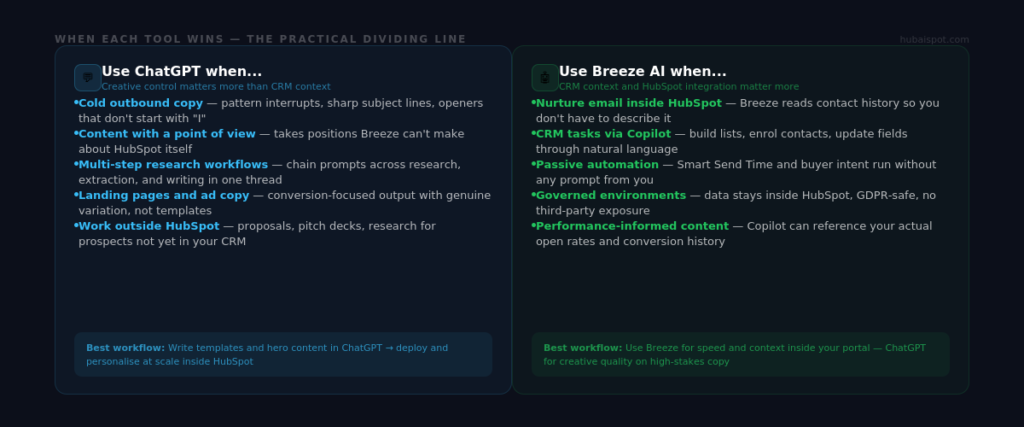
The workflow that works in practice is not “pick one” — it’s a defined handoff between the two tools based on what the task requires.
Use ChatGPT for: Cold outreach, landing page copy, blog content requiring a distinct voice, any task that benefits from multi-step prompt chains, anything outside your HubSpot ecosystem, image generation briefs.
Use Breeze for: Nurture email inside the HubSpot editor, CRM lookups and bulk actions via Copilot, workflows that respond to live contact behaviour, any content generation where contact context improves the output, governed environments where third-party data sharing isn’t permitted.
The handoff point: Write the template or framework in ChatGPT. Deploy and personalise it at scale inside HubSpot using Breeze. That combination consistently outperforms either tool used alone — which is the conclusion the full Breeze vs ChatGPT test arrived at across every task category.
For teams evaluating how to extend this stack with additional tools, the AI Tools for HubSpot Agencies breakdown covers where Clay, Lavender, Zapier AI, and others fit alongside both.
If you want the specific prompts to get the most out of ChatGPT inside your HubSpot workflow, the 25 HubSpot AI Prompts library is copy-paste ready. For a direct output quality comparison between Breeze and Copy.ai, see HubSpot Breeze AI vs Copy.ai.
Leave a Reply