
Copy.ai has been around long enough that most marketers have an opinion about it. Hubspot Breeze AI vs Copy.ai is a tough question to answer. Either it’s the AI tool they swear by for first drafts, or it’s the subscription they cancelled after the novelty wore off.
HubSpot Breeze AI is newer, more integrated, and comes built into a platform you’re probably already paying for. The question marketers are actually asking: if you’re already in HubSpot, does Copy.ai add anything you can’t get natively? And if you’re considering Copy.ai, is Breeze a good enough reason to skip it?
This comparison is for HubSpot users specifically — not a generic AI writing tool roundup. The context is: you’re running marketing or sales through HubSpot and you want to know which AI writing tool fits that workflow best.
Hubspot Breeze AI vs Copy.ai – What Each Tool Actually Is
HubSpot Breeze AI is not a standalone AI writing tool. It’s a collection of AI features embedded across Marketing Hub, Sales Hub, and Content Hub. The writing-specific components — Content Assistant, AI Blog Writer, and Breeze Content Agent — live inside your HubSpot workflows. You don’t open a separate app; the AI sits where you’re already working.
For a full breakdown of what Breeze covers beyond just writing, see What AI Does HubSpot Use? A Plain-English Guide to Every Breeze Feature.
Copy.ai is a dedicated AI writing platform built around GTM (go-to-market) workflows. It started as a general AI copywriter but has since pivoted toward B2B sales and marketing use cases — email sequences, outbound copy, landing pages, blog posts, and brand voice consistency. It’s a standalone tool that integrates with HubSpot and other platforms via native connectors and Zapier.
The fundamental difference: Breeze is integrated and contextual. Copy.ai is more capable as a pure writing tool but sits outside your workflow.
The Tests
I ran both tools through four use cases that represent the most common writing tasks for HubSpot marketing teams. Same briefs, same evaluation criteria.
Test 1: HubSpot Email Copy (Marketing Hub)
The task: Write a nurture email for contacts who downloaded a content offer about AI marketing tools, moving them toward a free consultation offer. Tone: helpful, not pushy.
Breeze AI (Content Assistant): Inside HubSpot’s email editor, Content Assistant generated a complete email in about 12 seconds. Because it had access to the contact segment and the associated content offer in the portal, it referenced the correct lead magnet without me needing to describe it. The email structure was sound — a soft hook, a value statement, a low-commitment CTA. The language was slightly formal but required minimal editing for a nurture context.
Copy.ai: I used Copy.ai’s Email Sequence template, feeding it the lead magnet topic, the ICP description, and the desired CTA. It produced four email variations in one generation — more output than Breeze, but I had to provide all the context manually. The writing quality was slightly sharper, with better subject line variation. But it had no way of knowing what the contact had actually done, so the personalization was ICP-level, not contact-level.
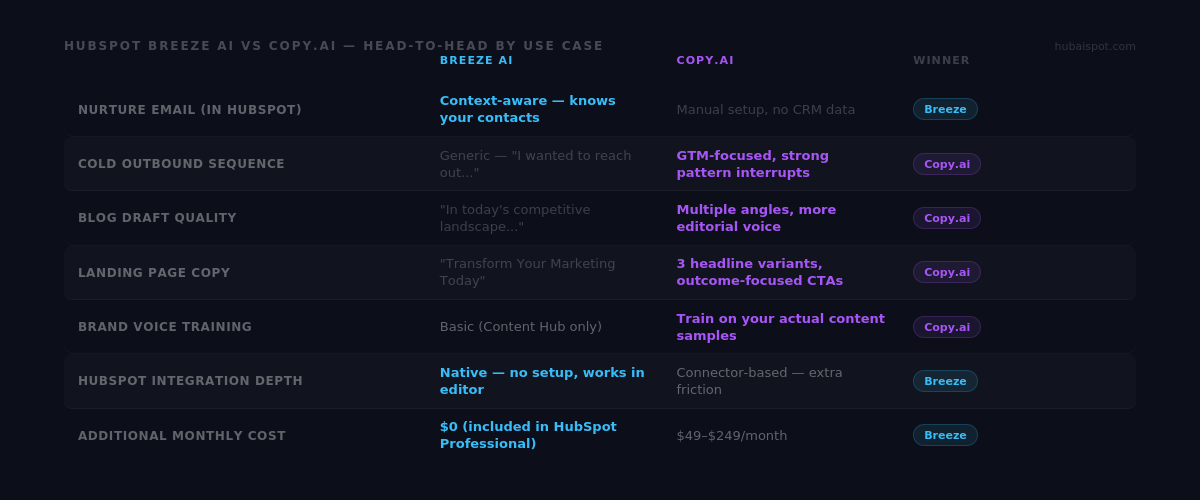
Winner: Breeze AI — for contextual nurture email inside HubSpot, the native data access is a genuine advantage. The email Breeze produced was relevant to the actual segment. Copy.ai produced better raw copy, but without contact context.
Test 2: Cold Outbound Email Sequence (Sales Hub)
The task: Write a 3-email cold outbound sequence targeting marketing managers at Series B SaaS companies. Offer: a HubSpot audit service. Tone: direct, no corporate filler.
Breeze AI (Prospecting Agent + Content Assistant): The Prospecting Agent pulled some basic company context for a test prospect, then Content Assistant drafted the first email. The output was competent but generic — the subject line was “Optimize Your HubSpot Setup” and the opening was “I wanted to reach out about…” Both are exactly the patterns that kill cold email reply rates.
Copy.ai (Outbound Email workflow): Copy.ai’s GTM-focused templates are clearly designed for cold outbound. The subject line suggestions varied in approach — curiosity gap, pattern interrupt, direct value proposition. The body copy led with a problem frame rather than a product pitch. Email 3 in the sequence used a different angle than Email 1, which Breeze didn’t do at all.
Winner: Copy.ai — for cold outbound, Copy.ai’s dedicated GTM focus produces meaningfully sharper copy. The structural understanding of what makes a cold email convert is built into the templates in a way that Breeze’s general content generation isn’t.
This matches the finding from our HubSpot Breeze AI vs ChatGPT comparison — Breeze consistently underperforms standalone AI tools on cold outbound copy, where every word needs to earn its place.
Test 3: Blog Post Draft
The task: Draft an outline and introduction for a post titled “5 HubSpot Automation Workflows Every B2B Team Should Build.”
Breeze AI (Content Agent): The Content Agent produced a logical 6-section outline in about 30 seconds, directly inside the HubSpot blog editor. The introduction opened with “In today’s competitive B2B landscape…” — a phrase that should be banned from all content forever. The outline itself was serviceable but predictable: it hit all the obvious sections without any distinctive angle or point of view.
Copy.ai (Blog Post workflow): With a brief prompt, Copy.ai generated two full outline variations — one structured around team size, one around funnel stage. The introductions led with a tension rather than a generic scene-setting paragraph. The section headers had more personality. It felt like a starting point with editorial intent rather than a populated template.
Winner: Copy.ai — for blog content with a distinct voice and angle, Copy.ai’s output is closer to a usable first draft. Breeze’s blog drafts need more structural rethinking before editing.
For the automation workflow content itself, we’ve already documented 10 HubSpot Automation Recipes You Can Build With AI Prompts — worth using as a reference for what genuinely useful automation content looks like versus what AI generators tend to produce.
Test 4: Landing Page Copy
The task: Write a landing page headline, subheadline, three benefit bullets, and a CTA for a HubSpot implementation service. Target: marketing directors at 50–200 person companies.
Breeze AI (Content Assistant in Page Editor): Generated a headline in the page editor: “Transform Your Marketing with Expert HubSpot Implementation.” Subheadline: “Streamline your workflows and drive growth with our HubSpot expertise.” The benefit bullets were generic, three-word fragments with no specificity. The CTA was “Get Started Today.”
This output would not convert. It’s identical to what every HubSpot partner agency has on their website.
Copy.ai (Landing Page workflow): Produced three headline variations with different positioning angles — one leading with speed (“Go Live in 30 Days”), one with risk reduction (“HubSpot Done Right the First Time”), one with outcome (“From CRM Chaos to Clean Pipeline”). The benefit bullets were specific and tied to real outcomes. The CTA options included alternatives beyond the generic “Get Started.”
Winner: Copy.ai — not close. For conversion-focused copy where every word directly impacts a business result, Copy.ai’s dedicated templates and awareness of what converts produces dramatically better output than Breeze’s general content generation.
The Integration Difference
Here’s where the comparison becomes less binary.
Copy.ai’s HubSpot integration has improved significantly. You can now push Copy.ai generated content directly into HubSpot contact properties, create content from HubSpot CRM data, and use the GTM AI platform to run workflows that interact with HubSpot objects. For teams doing high-volume outbound prospecting, the combination of Copy.ai’s writing quality and HubSpot’s CRM data is powerful.
But the integration is still a bridge between two separate tools. Breeze is native. The friction difference matters more than it sounds in daily practice — when you’re writing a follow-up email inside a HubSpot deal record at 4pm with a deadline, “open Copy.ai, write it there, come back and paste” adds steps that Breeze doesn’t.
For the AI tools that work best alongside HubSpot — including how Copy.ai fits into a broader stack — see Best AI Tools for HubSpot Agencies in 2026.
Pricing Comparison
HubSpot Breeze AI (Content Assistant and basic features):
- Included with all HubSpot paid plans from Starter upward
- Content Agent (autonomous blogging) requires Marketing Hub Professional ($890/month) or Content Hub
- If you’re already paying for HubSpot Professional, Breeze writing features cost you nothing extra
Copy.ai:
- Free plan: 2,000 words/month — insufficient for any serious marketing use
- Starter: $49/month — individual use, most writing templates included
- Advanced: $249/month — GTM workflows, API access, team features
- Team and Enterprise pricing available at scale
For a solo marketer or small team already on HubSpot Professional, the argument for paying an additional $49–249/month for Copy.ai depends entirely on whether the copy quality difference generates more value than its cost. For cold outbound and conversion copy, the answer is often yes. For nurture email inside HubSpot, probably not.
The Verdict
Copy.ai wins on output quality — particularly for cold outbound email, landing page copy, and blog content where voice and conversion intent matter. It’s a better pure writing tool, and its GTM focus means it understands what marketing and sales copy is supposed to accomplish, not just how to generate text.
Breeze AI wins on integration — for tasks where HubSpot’s contact, deal, and company data improves the output, Breeze produces more relevant results with less setup friction. Nurture emails, CRM-connected workflows, and in-editor copy generation are where Breeze earns its keep.
The practical recommendation for HubSpot users:
If your biggest writing bottleneck is cold outbound and top-of-funnel copy — sequence emails, ad copy, landing pages — Copy.ai is worth the Starter plan. The quality gap on these tasks is meaningful enough to justify it.
If your biggest bottleneck is in-portal writing speed — nurture emails, workflow copy, quick content edits in the editor — Breeze’s native integration handles this well enough that a separate tool isn’t necessary.
Most mature HubSpot marketing teams end up using both: Breeze for speed inside workflows, Copy.ai for quality on high-stakes copy that needs to convert. The two tools don’t overlap as much as they appear to at first glance.
What Copy.ai Does That Breeze Never Will
There’s one Copy.ai capability worth calling out separately: brand voice training.
Copy.ai allows you to feed it examples of your existing content — emails, blog posts, sales decks — and train a brand voice model that shapes every piece of output. The result is AI-generated content that actually sounds like you, not like averaged-out marketing language.
Breeze has a brand voice feature in Content Hub, but it’s less sophisticated and requires more manual configuration. For agencies managing multiple client voices simultaneously, Copy.ai’s brand training is a genuine differentiator.
This is particularly relevant if you’re running content for HubSpot clients through an agency. Each client voice stays distinct in Copy.ai in a way that Breeze doesn’t support natively. For the full agency stack discussion, see Best AI Tools for HubSpot Agencies in 2026.
The One Scenario Where Breeze Wins Clearly
If you’re using HubSpot’s AI lead scoring — and you should be, once your deal history is sufficient — Breeze’s contextual awareness becomes your biggest writing advantage for one specific task: MQL handoff emails and contact-specific nurture.
When Breeze knows that a contact scored 82 on fit and 68 on engagement, downloaded three content offers, visited the pricing page twice, and works at a 120-person SaaS company — it can generate nurture copy that reflects all of that context without you feeding it a single line of information. Copy.ai cannot do this, because it doesn’t have access to your CRM.
For the full lead scoring setup that makes this possible, see How to Set Up AI-Powered Lead Scoring in HubSpot.
Quick Reference
| Breeze AI | Copy.ai | |
|---|---|---|
| Cold outbound email | ⚠️ Generic | ✅ Strong |
| Nurture email (in-HubSpot) | ✅ Context-aware | ⚠️ Manual setup |
| Blog drafts | ⚠️ Safe, predictable | ✅ More editorial |
| Landing page copy | ❌ Weak | ✅ Strong |
| Brand voice training | ⚠️ Basic | ✅ Sophisticated |
| HubSpot integration depth | ✅ Native | ⚠️ Connector-based |
| Additional cost | ✅ Included | $49–249/month |
| Cold outbound sequences | ❌ Poor | ✅ Purpose-built |
Already using Breeze AI and want to know how to get the most out of what you have? See the full Is HubSpot Breeze AI Actually Worth It? An Honest Review — including the features most users never activate. For copy-paste AI prompts that work inside HubSpot’s Content Assistant, see 25 HubSpot AI Prompts That Make Marketing Work Faster.
Leave a Reply