
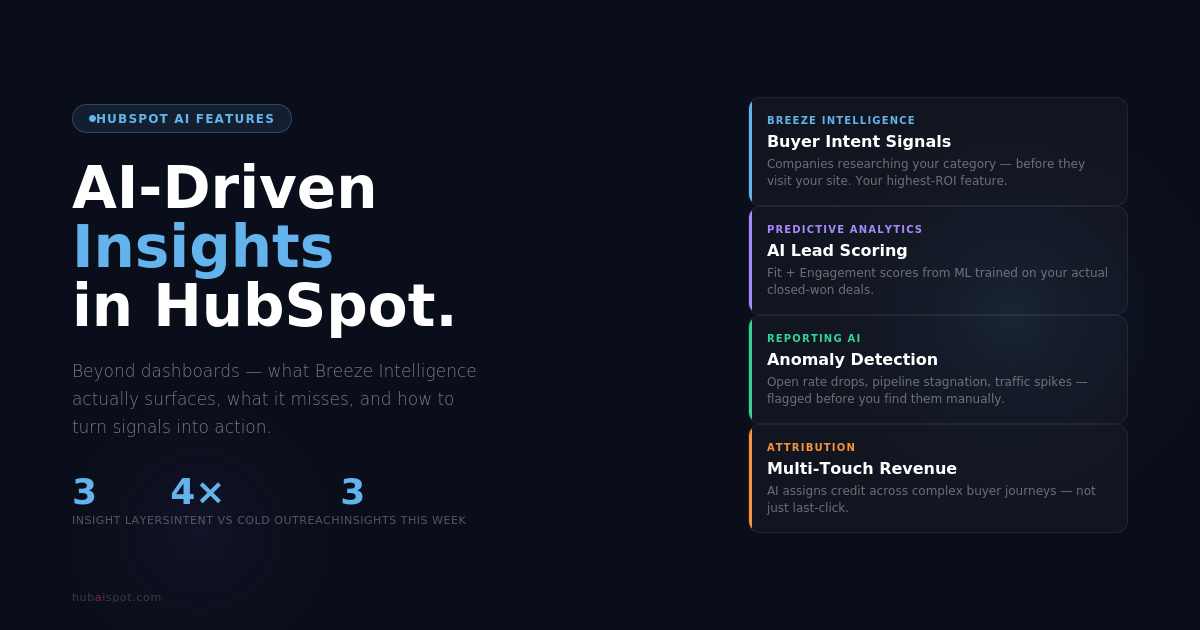
Most marketing teams have more data than they know what to do with.
AI-Driven Insights HubSpot alone generates contact records, email engagement rates, page views, deal stages, form submissions, workflow completions, ad attribution, and session data — all in one portal. Add a few integrations and you’re looking at hundreds of data points updating in real time.
The problem was never a lack of data. It was a lack of signal. Knowing that your open rate dropped from 28% to 22% is data. Knowing why it dropped, which segment drove the decline, and what to do about it — that’s insight.
That’s exactly what AI-driven insights are supposed to deliver. And in HubSpot’s case, the promise is closer to reality than most vendors’ marketing suggests — with some important caveats.
What AI-Driven Insights Actually Mean in a HubSpot Context
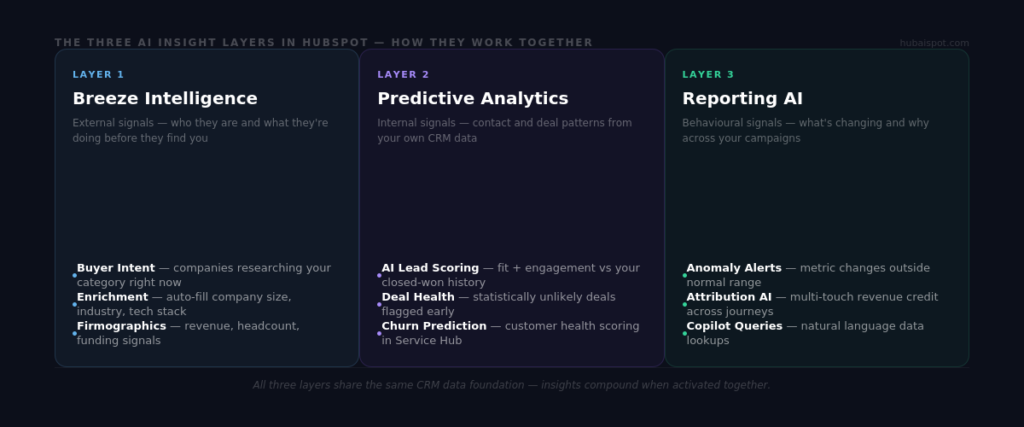
The phrase gets used loosely, so it’s worth being precise. In HubSpot, AI-driven insights come from three distinct sources, and they work differently.
Breeze Intelligence — HubSpot’s data enrichment and buyer intent layer. It surfaces insights about who your contacts are and what they’re doing outside your portal. Company size, tech stack, funding history, and — more valuably — whether a company is actively researching topics related to your category across the web.
Predictive Analytics Features — embedded across Marketing Hub and Sales Hub. These include AI lead scoring (which surfaces which contacts are most likely to convert based on historical patterns), deal health scores, and churn prediction signals for customer accounts.
Reporting AI / Anomaly Detection — still early in HubSpot’s product roadmap, but the Breeze Copilot can now surface anomalies in your data when asked. Open rate drops, traffic spikes, deal stage stagnation — Copilot can flag these when queried correctly.
These three layers work together but aren’t always visible as a unified system. Most users interact with one and don’t realise the others exist.
The Most Valuable AI Insight HubSpot Generates (That Most Teams Ignore)
Buyer intent data from Breeze Intelligence is the highest-signal, most underused feature in the entire suite.
Here’s how it works: Breeze Intelligence monitors content consumption patterns across the web — trade publications, review sites, competitor blogs, industry forums, G2, Capterra, and similar sources. When a company in your target market starts actively researching topics related to your category, HubSpot surfaces that company as an “intent signal” in your portal.
The critical distinction: these are companies that haven’t visited your site yet. They haven’t filled out a form. Your sales team has no idea they exist. But they’re in-market.
For a B2B team, this changes the outbound prospecting equation fundamentally. Instead of cold outreach to a static list of target accounts, you’re reaching out to companies showing active buying behaviour in real time. The difference in response rates is significant — intent-triggered outreach consistently outperforms cold volume outreach by a factor of two to four.
To activate it: Navigate to Breeze Intelligence → Buyer Intent → define your intent topics. The default topics HubSpot suggests are often too broad. Spend time identifying the specific terms your best customers were researching before they found you — competitor names, category terms, specific pain point phrases — and use those as your signals.
AI Lead Scoring: The Insight That Improves Every Downstream Decision
Traditional lead scoring tells you what a contact has done inside your portal. AI lead scoring tells you what that behaviour means in the context of your historical conversion data.
The difference matters more than it sounds.
A contact who visited your pricing page twice and opened three emails might score 75 points under a manual system. But if your closed-won data shows that contacts who also have a company size of 50–200 employees and a VP-level title convert at 4x the rate of contacts without those properties — a manual scoring model won’t weight that correctly unless you explicitly programmed it in.
HubSpot’s AI lead scoring model analyses your historical closed-won and closed-lost deals, identifies which combinations of properties and behaviours were most predictive of conversion, and builds a dynamic model around those patterns. It produces two separate scores: a fit score (who they are) and an engagement score (what they’ve done).
The practical insight this generates: you can see, at a glance, which contacts in your database are high-fit but low-engagement (prime nurture targets), high-engagement but low-fit (qualify carefully, don’t waste sales time), and the intersection of both (immediate sales priority).
That segmentation insight drives better email personalisation, better workflow branching, and better sales prioritisation — all downstream from a single AI-generated data point.
What AI-Driven Insights Look Like in the Reporting Layer
HubSpot’s reporting has improved significantly in 2024 and 2025, but the AI layer in reporting is the least mature of the three areas.
What exists and works today:
Breeze Copilot for data queries. You can ask Copilot questions about your portal data in natural language — “show me contacts who opened the last three emails but haven’t booked a meeting,” “which deals have been in Proposal Sent for more than 14 days,” “what was my email open rate last month compared to the month before.” For straightforward queries, this saves meaningful time versus building filters manually.
Anomaly alerts. On higher-tier plans, HubSpot can flag when a key metric moves significantly outside its normal range. A 40% drop in landing page conversion rate, a spike in unsubscribes after a specific email, a deal stage that’s seeing unusually high dropout — these get surfaced as alerts rather than requiring you to check dashboards proactively.
Attribution modelling. HubSpot’s multi-touch revenue attribution isn’t new, but the AI layer that helps assign credit across complex, non-linear buyer journeys has improved. For teams running simultaneous content, email, paid, and event channels, the attribution model now does a better job of surfacing which touchpoints actually influenced closed revenue — not just which ones appear in the path.
What doesn’t yet exist in a meaningful way: truly proactive insight generation. HubSpot’s AI doesn’t yet surface “you should look at this” unprompted in a way that changes how most teams operate day-to-day. The Copilot approach requires you to ask the right question. That’s a meaningful limitation, and it’s where tools like Supermetrics with anomaly detection add incremental value for larger teams.
Three Insights You Can Generate in HubSpot This Week
These are practical, not theoretical. Each takes under 30 minutes to set up.
1. Which contacts in your database look like your best customers but have never been contacted?
Build a contact list in HubSpot filtered by: AI Fit Score ≥ 70 AND Last Contacted Date is unknown AND Lifecycle Stage is Lead. Cross-reference with Breeze Intelligence company data to ensure the records are enriched. This list is your highest-potential cold outreach target — contacts who match your ICP but haven’t been worked yet.
2. Which deals are statistically unlikely to close this quarter?
In Sales Hub, use the deal health score (available on Professional and above) to filter deals where health is Low AND close date is within 90 days. This is your at-risk pipeline. An AI model trained on your historical close rate data is telling you these deals need intervention — not a human gut feeling.
3. Which companies in your target market are actively researching right now?
With Buyer Intent activated, build a workflow that fires when a target company reaches a high intent score: notify the relevant sales rep, create a task to research the company, and queue an outreach email for review. This turns a passive insight into an active sales motion.
The Honest Limitation
AI-driven insights are only as good as the data they’re trained on.
HubSpot’s models learn from your historical data. If your CRM has incomplete contact records, inconsistent lifecycle stages, deals logged with missing properties, or contacts who were never properly qualified, the AI will learn from those gaps. A lead scoring model trained on dirty data produces dirty scores. Buyer intent signals that aren’t mapped to specific, relevant topics produce noise rather than signal.
Before investing time in activating AI insights, spend a session on data hygiene: fill in missing company properties using Breeze enrichment, audit your lifecycle stage definitions, and close out any deals that were abandoned but never marked as lost.
The ROI on clean data is higher than the ROI on any individual AI feature. The AI features amplify what’s already there — good or bad.
The Bottom Line
AI-driven insights in HubSpot are not a replacement for analytical thinking. They’re a layer that surfaces patterns faster than manual analysis, flags signals you’d otherwise miss, and helps prioritise where human attention should go.
The three areas where they deliver genuine value today: buyer intent identification, AI lead scoring, and Copilot-driven data queries. The area with the most upside but still early in development: proactive anomaly detection and reporting intelligence.
For marketing and sales teams already running HubSpot Professional or Enterprise, these features are included and worth activating systematically. For teams on Starter, the AI insight layer is limited — the case for upgrading rests on the broader platform value, not AI insights alone.
For the step-by-step guide to setting up AI lead scoring specifically, see How to Set Up AI-Powered Lead Scoring in HubSpot. For an overview of all Breeze AI features and which ones are actually worth your time, see Is HubSpot Breeze AI Actually Worth It? An Honest Review.
Leave a Reply