
HubSpot announced Fall 2026 at their UNBOUND conference in September, and if you were watching the keynote, you heard a lot of words like “foundational,” “transformational,” and “agentic.” The crowd cheered. The demos looked clean.
Now that the dust has settled and the public beta has been rolling out across portals, it’s worth asking the more boring but useful question: what actually changed?
I’ve been working inside the new Breeze Assistant across a Marketing Hub Professional portal for the past few weeks. This post covers what’s real, what’s still catching up to the marketing, and where the genuine improvements are.
What Breeze Assistant Was Before This Update
To understand what changed, you need to remember what the old Breeze experience was. Before Fall 2026, Breeze was essentially a collection of separate tools that happened to share a name. You had Breeze Copilot in the sidebar (useful for quick questions about your CRM data), Breeze Content Agent for blog drafts, Breeze Prospecting Agent for sales outreach, and a handful of other agents accessed through different corners of the platform.
They didn’t talk to each other. If you asked Breeze Copilot to help you with a campaign, it could answer questions but couldn’t kick off the actual work. The agents were siloed. You had to navigate to each one separately, and the results didn’t feed into each other.
The other limitation was context. Breeze tools could pull from your CRM and your HubSpot content, but the quality of what came back depended heavily on how clean and complete your portal data was. If your contact records were messy, your AI outputs were messy too. HubSpot knew this problem. Fall 2026 is largely their answer to it.
What’s Actually New in Breeze Assistant
A Single Entry Point That Orchestrates Other Agents
The biggest structural change is that Breeze Assistant is now a coordinator. You don’t go to individual agents anymore — at least not for most tasks. You go to Breeze Assistant, describe what you want in plain language, and it pulls in the right specialized agents to complete the work.
Ask it to plan a campaign for a product launch, and it will draft the campaign brief, pull relevant audience segments from your CRM, suggest an email sequence, and flag which content assets already exist in your portal versus what needs to be created. It’s connecting steps that used to require you to manually move between five different tools.
This is a real improvement. It doesn’t always work perfectly — we’ll get to that — but the underlying concept is sound and the execution is good enough to be genuinely useful.
Context Home: Why This Is the Feature That Actually Matters
Behind the scenes, what’s making Breeze Assistant smarter is something called Context Home. This is less visible than the new chat interface, but it’s arguably the more important change.
Context Home is a dashboard inside Agent Hub where you can see and manage what HubSpot’s AI knows about your business. Your brand voice, your product descriptions, your target personas, your company positioning — all of it lives in one place where every AI feature in the platform can draw from it.
Before this existed, each Breeze tool had to infer context from your CRM data alone. Now you can actively shape what the AI knows. You can write a brand voice description. You can describe your ICP in detail. You can upload positioning docs.
The practical result is that AI-generated content and suggestions become noticeably more specific to your business rather than generic. Whether that specificity matches reality depends on how carefully you set up Context Home, but the mechanism is solid.
If you’re evaluating the Fall 2026 update and you want to know where to start, start with Context Home. It’s not the flashiest part of the release, but it’s what makes everything else work better.
Third-Party Connectors: Gong, G2, Asana, Slack, and More
Breeze Assistant can now connect to tools outside HubSpot through a growing list of native connectors. The initial lineup includes Gong, G2, Asana, Slack, Box, Canva, Xero, and Fathom, among others.
The Gong connector is worth calling out specifically. If you’re using Gong for call intelligence, you can now pull call insights directly into a Breeze Assistant conversation. Ask it “what objections did prospects raise in calls last month?” and it can pull from Gong data alongside your HubSpot deal records to give you an answer without leaving the platform.
That’s a meaningful workflow improvement for sales teams doing pipeline review or coaching prep.
The G2 integration lets you pull buyer intent signals into Breeze, which feeds into the Prospecting Agent’s targeting logic. If a prospect just left a G2 review for a competitor, that signal can now surface inside HubSpot and trigger agent actions.
Scheduled Prompts: Set It and Come Back Later
This is a small feature but a useful one. You can now schedule prompts to run at a specific time and come back to the results later.
Practical example: every Monday morning, schedule a prompt that asks Breeze to summarize deals that moved stage last week, flag any that have gone quiet for 14+ days, and draft a re-engagement suggestion for each. Come in on Monday and the analysis is waiting for you.
For teams doing regular pipeline reviews or weekly reporting, this eliminates a chunk of manual prep work.
Voice Input on Mobile
The mobile app now supports voice input for Breeze Assistant. You can talk to Breeze instead of typing. For sales reps logging follow-up tasks or capturing notes after a meeting, this is a legitimate quality-of-life improvement.
It’s not a groundbreaking AI feature, but it removes friction in a workflow that’s actually common.
What the Marketing Overstated
“Self-Executing” Overstates What Agents Actually Do
The Fall 2026 messaging leaned hard on Breeze as an agent that takes action, not just answers questions. And it can do more than the old version could. But “takes action” requires more qualification than the keynote gave it.
Breeze can draft emails. It can suggest workflow changes. It can create content assets. What it can’t do without human approval is send emails to your contacts, change deal stages en masse, or publish content to your site. The actions it takes autonomously are scoped to drafting and recommending, with human review required before anything customer-facing happens.
This is reasonable from a risk management perspective. But if you watched the Fall 2026 demos and came away thinking Breeze would run campaigns on its own, you’ll find the reality is more of a very good co-pilot than a fully autonomous agent.
The Self-Updating CRM Has Limits
Another headline feature from Fall 2026 is the self-updating Smart CRM. The idea is that HubSpot can now update contact and deal records automatically by pulling from email conversations, call transcripts, and meeting notes without requiring reps to manually log everything.
It works. For logged calls and connected email accounts, the CRM does update deal records more reliably than before. HubSpot’s own data says customers using this see a meaningful reduction in manual data entry.
What it doesn’t do is pull updates from tools that aren’t connected. If your rep had a critical conversation on WhatsApp or sent a proposal through a tool outside HubSpot, the CRM has no way to capture that. The self-updating feature is as good as your integration coverage. For teams with tight HubSpot integration across their stack, this is genuinely useful. For teams with fragmented tool usage, the gaps in the record will frustrate you.
Who Benefits Most From the Fall 2026 Update
The teams that will get the most out of this update are:
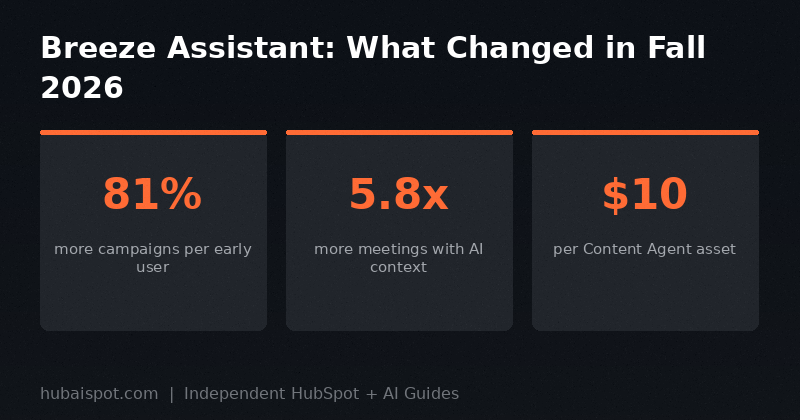
Marketing teams running frequent campaigns. The Campaign Agent and Content Agent, now accessible through Breeze Assistant, meaningfully reduce the time to spin up a new campaign. HubSpot’s own early customer data shows an 81% increase in campaigns created among Marketing Studio users. That tracks with what I’ve seen in practice — it’s faster to get from brief to assets.
Sales teams with clean CRM data. The Prospecting Agent’s buying signal detection and the Gong integration are most powerful when your deal records are current and your contact data is accurate. If you’ve been sloppy about data hygiene, Fall 2026 is a good prompt to fix that first.
RevOps teams managing multiple agents. Agent Hub gives you a centralized view of every agent running across your portal, including performance data. If you’ve built custom agents or enabled multiple Breeze agents across teams, having a single control plane is a genuine operational improvement.
What Hasn’t Changed
The fundamental limitation of AI in HubSpot is the same as it’s always been: the AI is only as good as the data it’s working with. Context Home helps you give it better context. The self-updating CRM helps keep records current. But if your portal is a mess of duplicate contacts, stale properties, and unmapped lifecycle stages, Breeze Assistant will produce polished-looking outputs built on bad inputs.
Before you get excited about what Breeze can do in Fall 2026, spend an hour in your portal’s data quality settings. Run a contact audit. Clean up your deal pipeline stages. Fill out Context Home with accurate positioning. That groundwork will make the Fall 2026 features work like they did in the demo.
How This Compares to What ChatGPT and Other AI Tools Offer
The recurring question when HubSpot ships AI features is: why not just use ChatGPT? It’s cheaper, it’s more flexible, and it can do a lot of the same drafting work.
The honest answer is context. ChatGPT doesn’t know your CRM data, your deal history, your audience segments, or your past campaign performance. Breeze does. When Breeze suggests a follow-up email for a deal that’s been stalled for 21 days, it’s using the actual deal data to write it. ChatGPT is working from a prompt you wrote from memory.
For teams that have invested in keeping their HubSpot data clean, the context advantage compounds quickly. For teams whose CRM is more filing cabinet than intelligence layer, that advantage shrinks. This is the same tension we looked at in our comparison of HubSpot Breeze AI vs ChatGPT.
Pricing and Credit Implications
Fall 2026 introduced a meaningful change to how agent usage is billed. Most Breeze features continue to be included with Professional and Enterprise tiers, but running agents now consumes HubSpot Credits.
Content Agent, for example, charges 1,000 credits per asset it generates. At HubSpot’s published pricing, that’s roughly $10 per asset created through Content Agent. If you were using Breeze Studio agents for free during the beta and expected that to continue, it didn’t. Agent Hub replaced Breeze Studio and brought credits-based billing with it.
This is worth building into your planning. If your team is going to use Content Agent heavily, the credits consumption can add up. Budget accordingly or set usage limits in your AI Settings before rolling this out team-wide.
Should You Enable It?
Yes, with the caveat that you do some prep work first.
Before enabling the new Breeze Assistant features:
1. Set up Context Home with an accurate brand voice description, your ICP definition, and your product positioning.
2. Connect any third-party tools you want Breeze to pull from — Gong if you have it, Slack at minimum.
3. Run a data quality check on your most-used contact and deal properties.
4. Set credit limits in AI Settings so you don’t get surprised by usage charges.
After that setup, the new Breeze Assistant is the best version of HubSpot’s AI that’s existed. It’s not the fully autonomous agent system the keynote implied, but it’s a legitimately useful co-pilot that’s meaningfully better than what it replaced.
For a full picture of how the 30-day review stacks up, see our HubSpot Breeze AI review alongside this update.
HubAISpot covers independent, practical guides on HubSpot and AI for marketers and sales teams. No vendor relationships. No paid placements.
Leave a Reply