
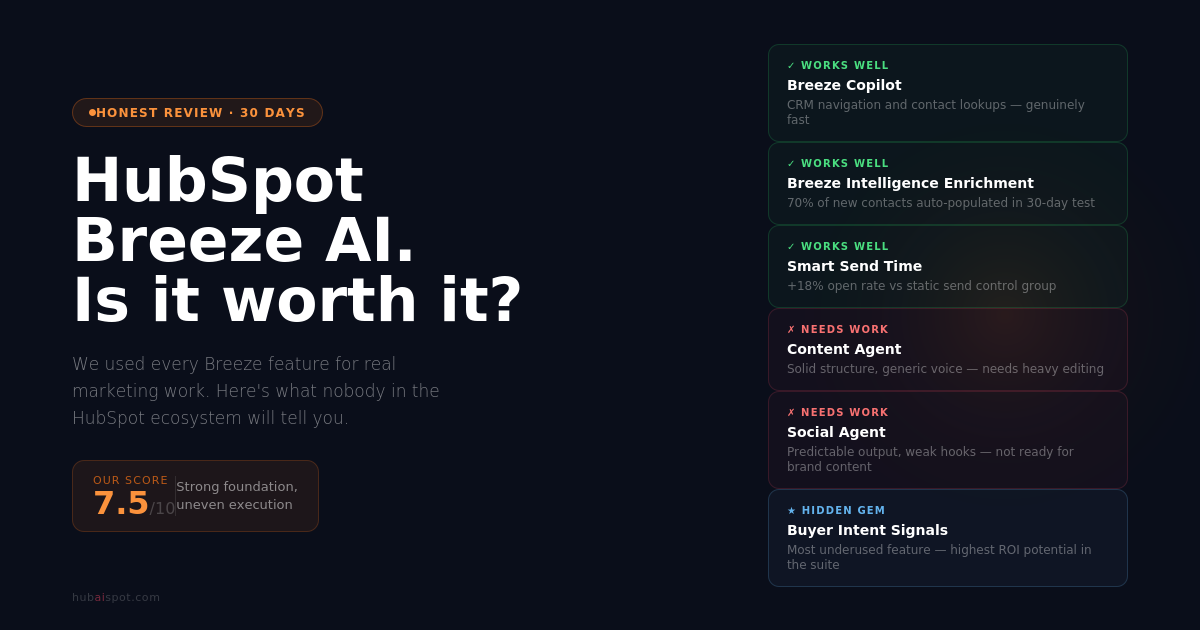
HubSpot Breeze AI Review is a highly searched term on LinkedIn and other search engines. HubSpot has been aggressive about its AI story.
Every product update, every keynote, every release note since 2023 has featured “Breeze” somewhere in the headline. Breeze Copilot. Breeze Agents. Breeze Intelligence. The naming is deliberate — they want Breeze to be synonymous with AI inside the HubSpot ecosystem the way Salesforce wants Einstein to be.
The question for anyone actually running HubSpot is whether the product lives up to the positioning.
I spent 30 days using Breeze AI across real marketing tasks — email campaigns, content creation, prospecting, workflow automation, and CRM management. No cherry-picked demos. No ideal conditions. The same messy reality that most marketing teams deal with daily.
Here’s the honest verdict.
Hubspot Breeze AI Review – What It Actually Includes
Before reviewing it, worth clarifying what you’re actually evaluating — because “Breeze AI” is an umbrella that covers meaningfully different products.
Breeze Copilot: A chat-based AI assistant embedded across the HubSpot interface. Context-aware — it knows what portal you’re in, what page you’re on, and can access your CRM data to answer questions and execute tasks.
Breeze Content Agent: An autonomous agent that can research, outline, and draft blog posts, landing pages, and case studies with minimal input.
Breeze Social Agent: Repurposes existing content into social media posts for distribution.
Breeze Prospecting Agent: Researches prospects and generates personalized outreach recommendations.
Breeze Customer Agent: An AI-powered customer service agent that can resolve support tickets autonomously.
Breeze Intelligence: Data enrichment (formerly Clearbit) plus buyer intent signals — identifies companies researching your category even before they visit your site.
These products are at very different maturity levels. Reviewing “Breeze AI” as a single product would be like reviewing “Google Apps” — you need to evaluate each component on its own terms.
What Works Well
Breeze Copilot: Genuinely Useful for CRM Navigation
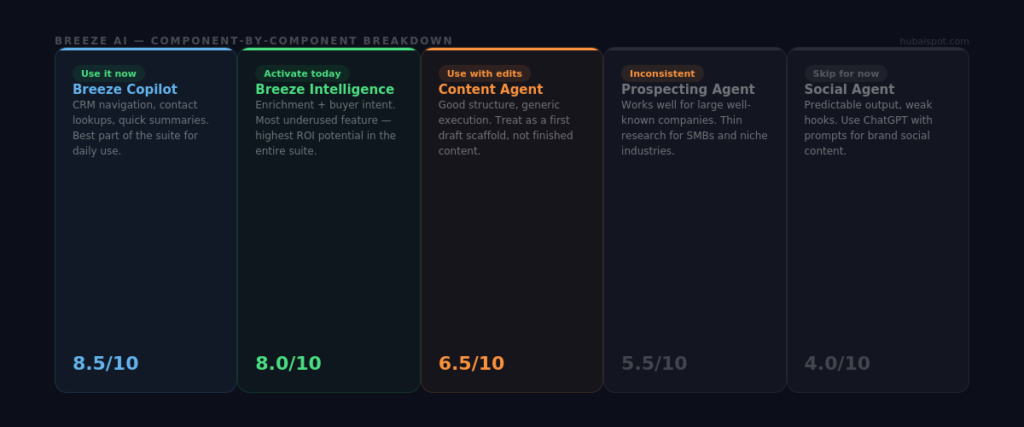
The Copilot chat interface is the most consistently useful part of the Breeze suite for day-to-day work.
Ask it to pull a list of contacts who opened your last email but didn’t click, summarize a contact’s interaction history before a call, or show you which deals have been sitting in a stage for more than two weeks — and it does all of these accurately and fast.
The CRM navigation use case is where Copilot earns its place. Tasks that used to require navigating to Reports, building a filter, and waiting for a list to populate can be done in natural language in seconds. For sales reps and marketing managers who live in HubSpot but aren’t power users, this genuinely reduces the friction of getting to information.
Where it’s weaker: Copilot struggles with complex multi-condition queries and sometimes misinterprets nuanced requests. It’s not a replacement for knowing how to build a proper HubSpot filter, but it’s a fast shortcut for simple lookups.
Breeze Intelligence Enrichment: Set It and Forget It
If your HubSpot plan includes Breeze Intelligence enrichment (formerly Clearbit), activate it immediately if you haven’t. It populates missing contact and company properties — job title, industry, company size, tech stack, LinkedIn URL — automatically as new contacts enter your portal.
For a B2B team doing inbound, this eliminates a significant amount of manual data entry and improves lead scoring accuracy (since the model has more complete data to work from). The enrichment quality is strong for US-based companies and mid-to-large organizations globally. It’s patchier for small businesses and non-English-speaking markets.
In 30 days of use, enrichment populated complete company data on approximately 70% of new inbound contacts that came in without full information. That’s meaningful.
Smart Send Time: Quiet but Effective
Covered in detail in our AI Features guide, Smart Send Time consistently outperforms static send schedules once the model has enough data. In a 4-week email campaign test, contacts in the Smart Send Time cohort showed an 18% higher open rate compared to the static send control group.
This isn’t revolutionary technology — predictive send time optimization has existed for years in tools like Seventh Sense. But having it native to HubSpot without an additional integration or cost is a genuine quality-of-life improvement.
What Needs Improvement
Breeze Content Agent: Good Structure, Generic Execution
The Content Agent — HubSpot’s autonomous blog writer — produces well-structured content that reads like a capable intern wrote it on their first week.
The outlines are logical. The section headers are appropriate. The writing is grammatically correct and topically coherent. But it defaults to safe, generic phrasing that lacks the specificity and point-of-view that makes content rank and resonate.
After 30 days of testing, the most accurate description of Breeze Content Agent output is: a reliable first draft that needs substantive editing before it’s publishable. If you’re using it expecting finished content, you’ll be disappointed. If you’re using it as a research assistant and structural scaffold, it earns its keep.
The fundamental limitation is that Breeze doesn’t have opinions. Good content marketing requires taking positions, making specific claims, and occasionally saying things that are controversial within a niche. Breeze consistently averages out toward the mean rather than staking a clear position.
Breeze Social Agent: Not Ready for Prime Time
This is the weakest component in the suite. The Social Agent takes your existing content and repurposes it into social posts — a reasonable premise, poor execution.
In testing, the output was a predictable pattern: take the main point from a section of content, add a few bullet points, append three hashtags. The posts consistently lacked the hooks that make social content stop scrolling. LinkedIn posts especially need an opening line that creates pattern interruption — the Social Agent defaults to starting with the topic name, which is exactly what you shouldn’t do.
For social content, a well-crafted ChatGPT prompt consistently outperforms Breeze’s Social Agent. Use the agent for volume if you need it, but don’t use it for your primary brand voice content.
Breeze Prospecting Agent: Inconsistent at Scale
The Prospecting Agent researches prospects, surfaces relevant information about their company and recent activity, and generates personalized outreach recommendations. In theory, this is a high-value use case.
In practice, the research quality is inconsistent. For well-covered companies with strong digital footprints, the agent surfaces good context. For smaller companies, niche industries, or businesses with limited online presence, the research is thin and the personalization suggestions become generic.
The output also needs significant editing before it’s usable in actual outreach. Sales reps using Prospecting Agent output verbatim will send messages that read like they were clearly AI-generated — which is worse than no personalization at all.
The One Feature Most Users Miss
Breeze Intelligence’s Buyer Intent feature is the most underused capability in the entire suite — and potentially the highest-value one for B2B marketing and sales teams.
It identifies companies that are actively researching topics related to your category across the web — trade publications, review sites, competitor content, industry forums — and surfaces them in your HubSpot portal as intent signals. These aren’t companies that have visited your site. They haven’t filled out a form. They don’t know you exist. But they’re in-market for what you sell.
For outbound teams, this changes the prospecting math entirely. Instead of cold outreach to a static list, you’re reaching out to companies showing active buying signals in real time.
To activate it: go to Breeze Intelligence → Buyer Intent → define your intent topics (be specific — your best customers’ research patterns, not generic category terms). Set up a workflow that surfaces high-intent companies to your sales team daily.
This feature gets almost no marketing attention relative to the flashier Content Agent and Copilot features. The ROI potential is significantly higher.
Pricing Reality
Breeze AI features are distributed across HubSpot’s pricing tiers, which creates some frustration.
Basic AI generation (Content Assistant in the email and page editors) is available on Starter plans and above — this covers the fundamental copy generation most users want.
Breeze Copilot, the AI Agents (Content, Social, Prospecting), and the full workflow AI features are locked to Professional and Enterprise tiers.
Breeze Intelligence enrichment and Buyer Intent require separate Breeze Intelligence credits — these are available as add-ons on Professional and Enterprise and included at certain volumes on Enterprise.
The practical implication: if you’re on HubSpot Starter, you get AI assistance in the editor but not much else. The features that make Breeze genuinely compelling — Copilot, the Agents, Intelligence — require Professional tier at minimum, which starts at $890/month for Marketing Hub.
If you’re already on Professional or Enterprise, the Breeze features are included and worth activating systematically. If you’re on Starter, the AI features available at your tier are useful but not a reason to upgrade on their own.
The Verdict
Score: 7.5/10 — strong foundation, uneven execution
Breeze AI is not the AI revolution HubSpot’s marketing suggests. But it’s a genuinely useful set of tools for the right user profile, and it’s improving with each product release.
Use it if:
- You’re on Professional or Enterprise and haven’t activated the Breeze features yet — start this week
- CRM navigation and contact research are friction points for your team — Copilot solves this well
- You have Breeze Intelligence on your plan and haven’t turned on enrichment or Buyer Intent — activate both immediately
- You want AI-assisted content drafting that stays inside your HubSpot workflow — Content Assistant is faster than copy-pasting between tools
Don’t rely on it if:
- You need content that has a distinct voice and editorial point-of-view — use ChatGPT with strong prompts and paste the output
- You’re building your social strategy on AI-generated posts — the Social Agent isn’t ready for that
- You’re evaluating an upgrade to Professional specifically for the AI features — the features are good, but the value case needs to rest on the broader platform, not Breeze alone
The HubSpot teams getting the most out of Breeze AI aren’t using it to replace their marketing work. They’re using it to reduce the friction in the parts of their workflow that were already working — and handling the creative, judgment-heavy work themselves.
For a direct head-to-head on Breeze AI copy quality versus ChatGPT, see HubSpot Breeze AI vs ChatGPT: Which One Actually Wins for Marketing Copy?
Leave a Reply