
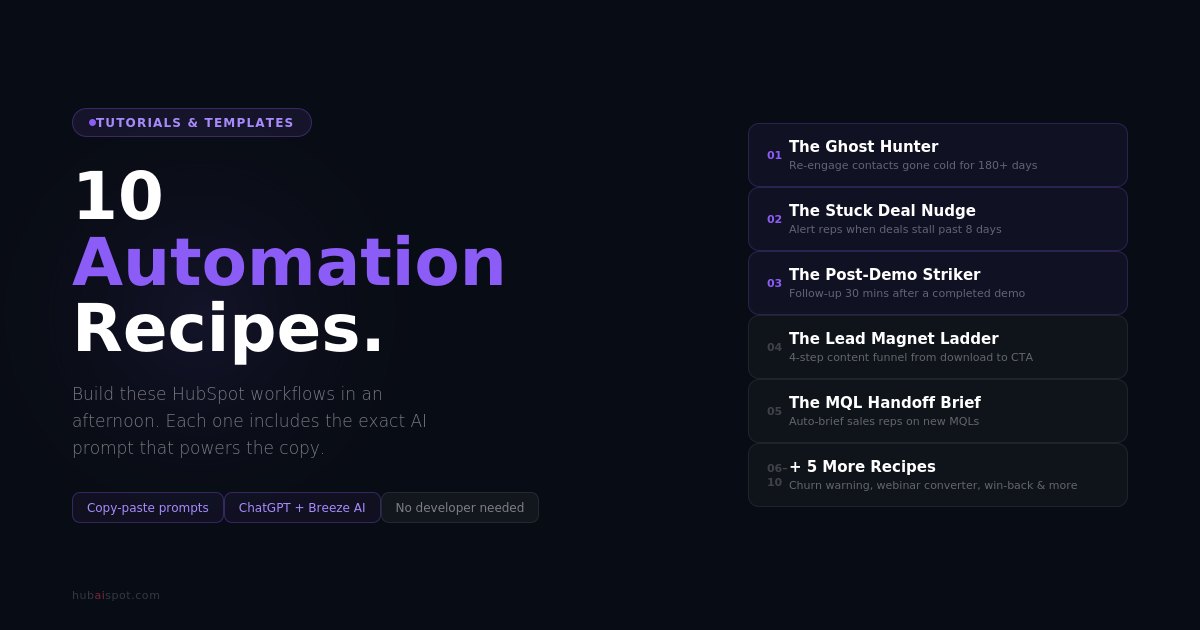
HubSpot automation Workflows AI isn’t easy to build, this article gives you AI prompts to help you establish this.
Most teams have a solid mental model of what they want the automation to do — re-engage cold leads, nudge stuck deals, follow up after a demo. The friction is sitting down to write the five emails, the three SMS messages, the internal notification copy that makes the workflow actually work.
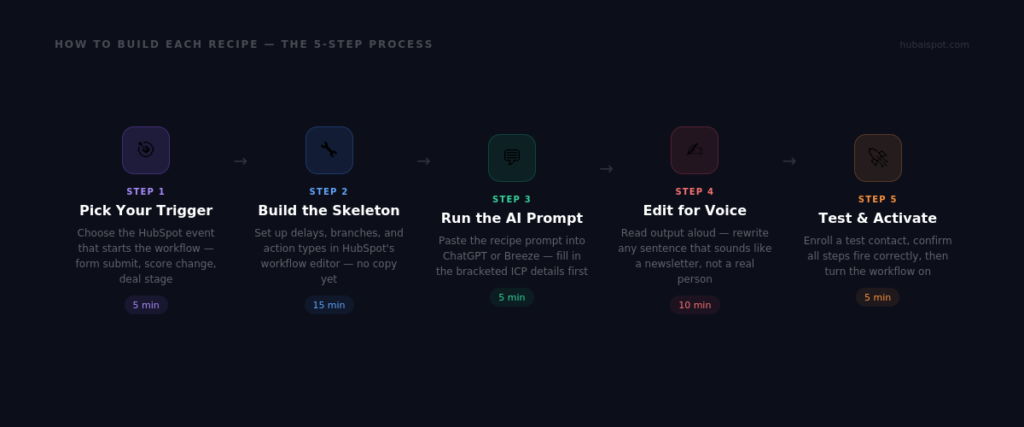
That’s exactly the problem AI prompts solve. You build the workflow skeleton in HubSpot, then use the prompts below to generate the copy that powers each step. Each recipe gives you the trigger, the workflow structure, and the exact prompt to paste into ChatGPT or HubSpot’s Content Assistant.
How to Build Hubspot Automation Workflows AI using Prompts
Recipe 1: The Ghost Hunter
What it does: Re-engages contacts who were active six months ago and have gone completely silent.
Why it matters: Most CRMs are full of contacts who showed real intent at some point and then disappeared. A well-timed re-engagement sequence recovers 5–10% of these contacts without any new lead generation spend.
Workflow setup:
- Trigger: Contact’s last activity date is more than 180 days ago AND lifecycle stage is Lead or MQL
- Delay: Send immediately
- Email 1 (Day 0): Pattern interrupt — make them wonder why you’re emailing
- Email 2 (Day 5): Value drop — share something genuinely useful with no ask
- Email 3 (Day 10): The honest close — tell them you’re removing them from your list unless they want to stay
AI Prompt:
“Write a 3-email re-engagement sequence for B2B contacts who went cold 6+ months ago. Company: [your company]. Our ICP: [describe]. Tone: direct, a little self-aware, not desperate. Email 1 should be a pattern interrupt that makes them curious. Email 2 should give them something valuable with no pitch attached. Email 3 should be honest — tell them you’re removing them and give them one clear reason to stay. Subject lines should not sound like marketing emails.”
Recipe 2: The Stuck Deal Nudge
What it does: Automatically alerts sales reps when a deal has been sitting in the same pipeline stage for too long, and generates a personalized follow-up suggestion.
Why it matters: Deals die in pipelines not because prospects lost interest, but because nobody followed up at the right time. The average B2B deal loses momentum at day 8 with no contact.
Workflow setup:
- Trigger: Deal stage last modified date is more than 8 days ago AND deal stage is NOT Closed Won or Closed Lost
- Action 1: Create task for deal owner — “Deal stuck: follow up today”
- Action 2: Send internal email to deal owner with deal context and suggested message
- Branch: If deal value is over $X, also notify sales manager
AI Prompt:
“Write an internal sales alert message to send to a rep when their deal has gone 8 days without movement. Include: the deal name (use token {{deal.name}}), stage it’s stuck in ({{deal.dealstage}}), days since last activity ({{deal.days_to_close}}), and a suggested follow-up message they can send to the prospect. Keep it short — this is a Slack-style internal message, not an email. The suggested follow-up should be one paragraph, direct, and reference the deal context.”
Recipe 3: The Post-Demo Striker
What it does: Triggers a high-urgency follow-up sequence the moment a meeting is logged as completed in HubSpot.
Why it matters: The window after a demo is your highest-intent moment with a prospect. Response rates in the 2 hours after a demo are 3–4x higher than 24 hours later. Most teams wait until the next day.
Workflow setup:
- Trigger: Meeting outcome is set to “Completed” AND meeting type is “Demo”
- Delay: 30 minutes
- Email 1: Summary + next steps (personalized to demo notes)
- Delay: 2 days
- Email 2: Handle the most common objection from the demo
- Delay: 4 days
- Email 3: Social proof + clear CTA to move forward
AI Prompt:
“Write a 3-email post-demo follow-up sequence. Context: we just completed a product demo for a [describe your product] with [contact’s job title]. Tone: confident, helpful, not pushy. Email 1 (send 30 min after demo): summarize what we covered and lay out clear next steps. Email 2 (2 days later): address the single most common objection we hear after demos — [describe objection]. Email 3 (4 days later): one customer story that mirrors the prospect’s situation, then a direct ask to move forward. Subject lines should feel like follow-up to a real conversation.”
Recipe 4: The Lead Magnet Ladder
What it does: Takes a contact who downloaded a top-of-funnel asset and progressively walks them down the funnel with increasingly specific content.
Why it matters: Single lead magnet downloads rarely convert directly. A 3-step content ladder that delivers increasing value — and increasing specificity — converts 2–3x better than a single nurture email.
Workflow setup:
- Trigger: Form submission on [specific lead magnet form]
- Email 1 (immediate): Deliver the asset + one unexpected bonus
- Delay: 3 days
- Email 2: Related practical guide — go one level deeper on the same topic
- Delay: 5 days
- Email 3: Case study or example of a company getting results with this approach
- Delay: 4 days
- Email 4: Soft CTA — offer a conversation, not a demo
AI Prompt:
“Write a 4-email nurture sequence for someone who just downloaded [lead magnet name and topic]. They’re interested in [topic] but haven’t shown any buying intent yet. Email 1: deliver the asset, add one extra tip they didn’t expect. Email 2: go deeper on [specific sub-topic] with a practical how-to — no pitch. Email 3: tell a short story about a company that tackled this problem and what happened. Email 4: soft CTA — invite a conversation about their situation, frame it as a call to help, not a sales call. Tone: helpful practitioner, not corporate marketer.”
Recipe 5: The MQL Handoff Briefing
What it does: When a contact crosses your MQL threshold, automatically sends the assigned sales rep a briefing with everything they need to know before making contact.
Why it matters: Sales reps waste significant time researching contacts before outreach. An automated briefing that surfaces the contact’s behavior, company details, and relevant context saves 15–20 minutes per MQL and dramatically improves the quality of first contact.
Workflow setup:
- Trigger: HubSpot lead score crosses MQL threshold (e.g., ≥ 70)
- Action 1: Set lifecycle stage to MQL
- Action 2: Rotate contact owner to sales team
- Action 3: Send internal briefing email to new contact owner
- Action 4: Create follow-up task due in 4 hours
AI Prompt:
“Write an internal MQL briefing email that a sales rep receives when a new lead crosses the scoring threshold. It should include: contact name and title ({{contact.firstname}} {{contact.lastname}}, {{contact.jobtitle}}), company name and size ({{company.name}}, {{company.numberofemployees}}), pages they’ve visited, emails they’ve opened, and their most recent action. End with 3 suggested conversation starters based on their behavior. Format: short, scannable, like a briefing doc not an essay. The rep should be able to read this in 90 seconds before making the call.”
Recipe 6: The Churn Early Warning
What it does: Detects customer health signals that predict churn risk and triggers proactive outreach before the customer decides to leave.
Why it matters: It’s 5–7x cheaper to retain an existing customer than acquire a new one. Churn usually shows up in behavior — login frequency drops, feature usage declines, support ticket volume spikes — before the cancellation request arrives.
Workflow setup:
- Trigger: Customer contact’s last login date is more than 30 days ago OR support tickets in last 30 days > 3
- Delay: 1 day
- Action 1: Notify customer success rep
- Action 2: Enroll in proactive check-in sequence
- Branch: If customer LTV > $X, notify CS manager and create high-priority task
AI Prompt:
“Write a 2-email proactive customer check-in sequence for a customer showing early churn signals (reduced login frequency or elevated support tickets). The goal is to get them on a call before they decide to cancel. Email 1: genuine check-in — acknowledge that we noticed they might not be getting full value, offer specific help. No corporate language. Email 2 (3 days later): share one specific tip or feature they haven’t used that directly addresses their most likely frustration. End with a direct calendar link. Tone: warm, direct, like a colleague who genuinely wants to help — not a retention script.”
Recipe 7: The Webinar-to-Pipeline Converter
What it does: Captures post-webinar intent and converts high-engagement attendees into sales conversations within 48 hours.
Why it matters: Webinar attendees represent the highest concentration of active interest in your calendar. Most teams send a single thank-you email and lose 80% of the intent within a week.
Workflow setup:
- Trigger: Contact attended webinar (meeting type = “Webinar” AND attendance = “Attended”)
- Branch: Attended entire session vs. dropped off early
- For full attendees:
- Email 1 (2 hours after): Recording + top 3 takeaways
- Email 2 (Day 2): Deeper resource on the webinar topic
- Email 3 (Day 4): Personalized CTA based on their engagement
AI Prompt:
“Write a 3-email post-webinar sequence for attendees who stayed for the full session. Webinar topic: [topic]. Key points covered: [3 main points]. Email 1 (2 hours after): thank them for attending, deliver the recording, highlight 3 specific moments they can rewatch. Email 2 (2 days after): go deeper on one topic from the webinar — give them something they can use today. Email 3 (4 days after): based on their interest in [topic], invite them to a one-on-one conversation to apply this to their specific situation. Don’t call it a demo.”
Recipe 8: The Referral Activator
What it does: Identifies recently closed-won customers at peak satisfaction and automates a referral ask at the right moment.
Why it matters: The best time to ask for a referral is 30–60 days after a customer achieves their first win with your product or service — when the value is fresh and they haven’t yet run into inevitable friction. Most companies either never ask or ask at the wrong time.
Workflow setup:
- Trigger: Deal stage changed to Closed Won AND deal close date is 30 days ago
- Condition: No open support tickets for this contact in the last 14 days
- Action 1: Enroll in referral sequence
- Action 2: Create task for account owner to confirm customer satisfaction before sequence sends
AI Prompt:
“Write a 2-step referral request sequence for a recently closed customer. They’ve been a customer for 30 days and are showing good engagement. Step 1 email: start with something genuine — acknowledge a specific result or milestone they’ve hit with us. Then make a simple, low-pressure referral ask. Give them an easy mechanism to refer (a link, a forward, or just a name). Step 2 (7 days later, only if no referral yet): lighter touch — share what a typical referral gets out of working with us, and make the ask again with one click. Tone: warm, authentic, no corporate ‘valued customer’ language.”
Recipe 9: The Content Upgrade Converter
What it does: Identifies contacts who have read three or more blog posts in a 7-day window — a strong buying signal — and converts them to email subscribers or MQLs.
Why it matters: Multiple blog visits in a short window indicate active research. These contacts have self-qualified their interest. Most teams never capture this signal because they’re not tracking reading behavior as a trigger.
Workflow setup:
- Trigger: Contact has viewed 3+ unique blog pages in the last 7 days (use HubSpot’s page view tracking)
- Condition: Contact is not already a subscriber or MQL
- Action 1: Trigger an on-site pop-up or chat message (via HubSpot’s chat/pop-up tools) offering a relevant content upgrade
- Action 2 (if form submitted): Enroll in content upgrade nurture sequence
AI Prompt:
“Write a 3-email sequence for a blog reader who just downloaded a content upgrade after reading multiple posts about [topic]. They’re clearly researching this topic but haven’t shown direct buying intent. Email 1 (immediate): deliver the content upgrade, add one extra resource. Email 2 (3 days): share the single most actionable thing they can do this week based on what they’ve been reading. Email 3 (6 days): ask a genuine question about where they are in their process — make it feel like a response to their reading behavior, not a generic CTA.”
Recipe 10: The Win-Back Campaign
What it does: Re-engages churned customers or lost deals at a 90-day interval when circumstances may have changed.
Why it matters: 20–30% of lost deals close within 12 months if followed up with the right message at the right time. Circumstances change — budgets open up, priorities shift, the competitor they chose disappoints. A systematic win-back sequence captures this without requiring sales rep memory.
Workflow setup:
- Trigger: Deal stage changed to Closed Lost AND deal close date is 90 days ago
- Condition: No new open deal for this contact or company
- Email 1: Check-in, no hard sell
- Delay: 30 days
- Email 2: New development — product update, new resource, relevant change
- Delay: 30 days
- Email 3: Direct ask — has anything changed?
AI Prompt:
“Write a 3-email win-back sequence for a prospect who chose not to move forward 90 days ago. We don’t know why they said no. Email 1: genuine check-in — acknowledge time has passed, ask how things are going with [their challenge], no pitch. Email 2 (30 days later): share one meaningful update about our product or company that’s relevant to the reason they were evaluating us — make it news, not marketing. Email 3 (30 days later): direct and honest — ask if anything has changed and if it makes sense to revisit. Give them an easy yes or easy no. Tone: like a salesperson who respects their time, not one who needs the deal.”
How to Use These Recipes
Each recipe is designed to be built in an afternoon. The workflow logic takes 20–30 minutes in HubSpot’s workflow editor. The copy takes as long as it takes to run the prompt, review the output, and adjust for your voice.
A few notes on using the prompts effectively:
Fill in the bracketed sections before running the prompt. The more specific you are about your ICP, your product, and your tone, the less editing the output needs.
Run the prompt twice and compare outputs. AI writing tools produce different results on each run. Generating two versions gives you better raw material to work from than trying to perfect a single output.
Edit for your voice last. The AI gives you structure and substance. You add the voice. Read the output out loud — if it sounds like a corporate newsletter, rewrite the sentences that feel generic.
Want the specific prompts to use inside HubSpot’s Content Assistant rather than ChatGPT? See 25 HubSpot AI Prompts That Make Marketing Work Faster for the full library.
Leave a Reply