
Most “best AI tools for hubspot agencies” lists are useless.
They rank tools by feature count, sort by affiliate commission rate, and treat a solo freelancer and a 25-person agency as if they have the same needs. They don’t.
The AI tools that make sense for a three-person agency running local service clients are completely different from the ones a 20-person B2B agency needs to deliver measurable pipeline results. The wrong tools at the wrong stage don’t just waste money — they create operational overhead that slows the whole team down.
This guide is structured by team size and use case. Find where your agency sits, and build from there.
Before the Stack: What AI Tools for HubSpot Agencies Needs First
Before adding any AI tools, every agency needs the foundation right.
HubSpot itself needs to be clean. No AI tool compensates for bad CRM data. If your client portals have duplicate contacts, inconsistent lifecycle stages, or properties that nobody fills in — fix that first. AI tools amplify what’s already in your data. If the data is bad, the AI outputs will be too.
You need at least one person who owns the stack. The agencies that get the most out of AI tooling have designated someone — even part-time — to evaluate, configure, and maintain the tools. Ad hoc adoption across a team without ownership produces five people using the same tool five different ways and nobody using it well.
Your core HubSpot workflows need to be running. Lead scoring, deal pipeline, email sequences, reporting dashboards. These should exist and function before you layer AI on top of them. Adding AI to broken workflows makes them more broken, faster.
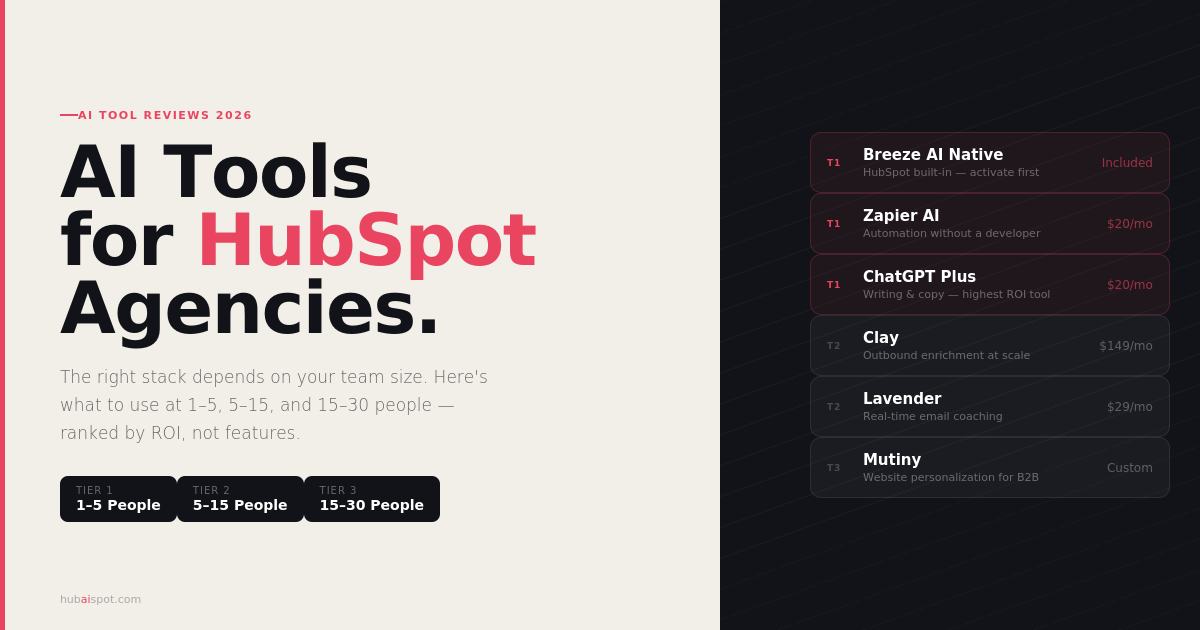
Tier 1: The 1–5 Person Agency
At this size, every tool decision is a significant commitment of time and money. The right philosophy is ruthless simplicity — one or two AI tools that solve your biggest friction points, nothing else.
Must-Have: HubSpot Breeze AI (Native)
If you’re running client work on HubSpot Professional or Enterprise, you already have Breeze AI included. Before buying anything external, activate every native feature first:
- Turn on Smart Send Time for all client email campaigns
- Activate Breeze Intelligence enrichment if it’s on your plan
- Use the Content Assistant for email and landing page copy drafting
- Set up Copilot for CRM navigation and contact lookups
For a small agency, the native Breeze features cover 70–80% of what paid AI tools promise. The remaining 20–30% is where targeted external tools earn their cost.
Worth Adding: Zapier AI ($20–$50/month)
At this size, you likely don’t have a developer. Zapier AI’s natural language workflow builder lets you create multi-step automations between HubSpot and your other tools by describing what you want rather than building it step-by-step.
The AI steps within Zapier — where you can insert a ChatGPT or Claude call into any automation — are particularly valuable. A common small agency use case: when a new HubSpot form submission comes in, pass the contact data to an AI that generates a personalized first response email, then send it via HubSpot. This is doable in under an hour with Zapier AI.
Best for: Automating the repetitive tasks that eat up your week — CRM updates, notifications, data syncing between tools.
Optional: ChatGPT Plus ($20/month)
Not technically a HubSpot integration, but essential for small agencies as a writing and thinking partner. At $20/month it’s the highest ROI subscription on this list for a 1–5 person team.
Primary use cases: drafting client reports and proposals, generating ad copy variations, creating content briefs, writing email sequences that get imported into HubSpot. Build a prompt library for your most common tasks and train it on your agency’s voice with a system prompt.
Skip for now: Clay, Lavender, Mutiny, and anything that requires dedicated setup time. These tools have real value at higher team sizes but create more overhead than benefit at the 1–5 person level.
Tier 2: The 5–15 Person Agency
At this size, you have specialization — a delivery team, an account management layer, and probably someone focused on growth. AI tools at this stage should support scaling without proportionally scaling headcount.
Clay ($149–$299/month) — If You’re Doing Any Outbound
Clay is the single most impactful AI tool for outbound-focused agencies in 2026. It enriches contact and company records from 50+ data sources, then uses AI to write personalized outreach at scale — and pushes the enriched records directly into HubSpot.
The practical workflow: build a target account list in Clay (pull from LinkedIn, Apollo, or a static list), enrich each record with company size, tech stack, recent news, and job changes, generate a personalized opening line for each contact using an AI prompt, then push the enriched contacts with their personalized first lines into HubSpot sequences.
The result is outbound prospecting that looks and feels researched — because it is, at scale.
Best for: Agencies running outbound campaigns for clients or themselves. Less value if you’re purely inbound.
Lavender ($29–$49/month per rep) — For Email-Heavy Teams
If your agency or your clients run high-volume email outreach through HubSpot sequences, Lavender’s real-time email coaching earns its cost quickly. It grades emails as reps write them, flags the specific phrases that destroy response rates (passive openers, emails over 120 words, subject lines that read like newsletters), and suggests corrections inline.
The Chrome extension integrates directly with HubSpot’s sequence editor, so the coaching layer sits on top of the tool your team is already using.
The ROI calculation is simple: if improving reply rates from 8% to 12% on outbound sequences is worth one additional client conversation per week, it pays for itself immediately.
Best for: Teams where multiple people are writing and sending sales emails. Less necessary for agencies where a single senior person writes all the copy.
Apollo.io (Free–$99/month) — For Contact Database Needs
If you regularly need to find and verify contact emails for outbound prospecting — either for your agency or for clients — Apollo’s database is large, reliable, and integrates natively with HubSpot.
The important caveat: if you’re using HubSpot Sales Hub Professional, the Prospecting and enrichment tools that have been added to HubSpot natively have reduced the gap. Evaluate whether you’re actually getting data Apollo can provide that HubSpot can’t before adding another subscription.
Best for: Agencies with high outbound volume who need verified contact data beyond what HubSpot’s native tools provide.
Notion AI or equivalent ($10/month) — For Internal Knowledge
At 5–15 people, institutional knowledge starts to become a real operational challenge. Notion AI (or similar tools — Confluence, Slite) with AI search and generation capabilities becomes valuable for maintaining SOPs, client documentation, and process guides that new team members can actually find and use.
This doesn’t touch HubSpot directly but supports the team that runs it.
Tier 3: The 15–30 Person Agency
At this size, the bottlenecks shift. It’s less about individual productivity and more about consistency — ensuring that 15 people are doing client work to the same standard, with the same quality bar, without every task flowing through one or two senior people.
Mutiny (Custom pricing, ~$1,500+/month) — Website Personalization at Scale
Mutiny uses AI to personalize client websites for different visitor segments — showing different headlines, copy, and CTAs based on who’s visiting. The HubSpot integration pulls contact and company data to inform the personalization logic.
At 15+ people, you likely have clients with enough inbound traffic to make this worthwhile, and you have the capacity to set it up and manage it. At smaller sizes, the setup overhead outweighs the benefit.
If you’re running content and demand generation for B2B clients with 1,000+ monthly website visitors, Mutiny is one of the most defensible AI tools to include in a premium retainer scope.
Best for: Agencies with B2B clients running established inbound programs. Premature for clients still building their audience.
Supermetrics ($99–$299/month) — Reporting at Scale
As client count grows, manual reporting becomes an agency-wide productivity drain. Supermetrics pulls data from HubSpot, paid media platforms, GA4, and other sources into Google Data Studio, Sheets, or Looker dashboards automatically.
The AI features in Supermetrics (anomaly detection, automated insight generation) are still early but useful for flagging performance changes that need attention across a large client portfolio.
Best for: Agencies managing 10+ client reporting obligations monthly. The ROI is proportional to how much time your team currently spends pulling and formatting data manually.
Jasper Teams ($125+/month) — For High-Volume Content Production
At 15+ people with dedicated content producers, Jasper’s brand voice training and team collaboration features become more relevant. Individual marketers can write in a consistent voice across clients without a senior person reviewing every piece.
That said: if your team has strong writers, a well-crafted ChatGPT system prompt often achieves similar output quality at lower cost. Jasper earns its premium over ChatGPT at scale when consistent brand voice across a large team is the specific problem being solved.
The Tools Worth Skipping at Any Size
AI tools that replace strategy with automation. If a tool promises to “automatically optimize your campaigns” without requiring human judgment, be skeptical. AI that operates without oversight tends to optimize for local maxima — better click rates, lower CPCs — while drifting from the actual business goal.
Tools that duplicate HubSpot functionality you’re not using. Before buying an AI writing tool, actually use HubSpot’s Content Assistant. Before buying a separate prospecting tool, activate HubSpot’s prospecting features. The best tools to add are the ones that do things HubSpot genuinely can’t — not slightly better versions of things HubSpot already does adequately.
Anything requiring more than one week of setup for a single use case. At agency scale, tool setup time is billable hours diverted. If a tool can’t demonstrate value within a week of implementation, the opportunity cost is too high.
Building the Stack Sequentially
The agencies with the most effective AI stacks didn’t buy them all at once. They added one tool at a time, validated the ROI, then added the next.
A sensible build sequence:
Month 1: Fully activate native HubSpot Breeze features (free for existing Professional subscribers). Add ChatGPT Plus.
Month 2–3: Add Zapier AI if automation gaps exist. Add Lavender if email volume warrants it.
Month 4–6: Evaluate Clay if outbound is a core activity. Evaluate Apollo if contact data is a bottleneck.
Month 6+: Consider Mutiny, Supermetrics, and Jasper Teams as the agency scales past 15 people and those specific bottlenecks emerge.
The goal isn’t to have the most tools. It’s to have the right tools running well — each one solving a specific, validated problem, each one integrated properly with HubSpot so your data stays clean and your workflows stay coherent.
For a detailed look at the HubSpot-native AI features you should activate before adding any external tools, see AI Features That Actually Move the Needle in HubSpot Marketing Hub. For a deep dive on Clay and the other top integrations, see Top 7 AI Tools That Actually Enhance HubSpot Integration.
Leave a Reply