
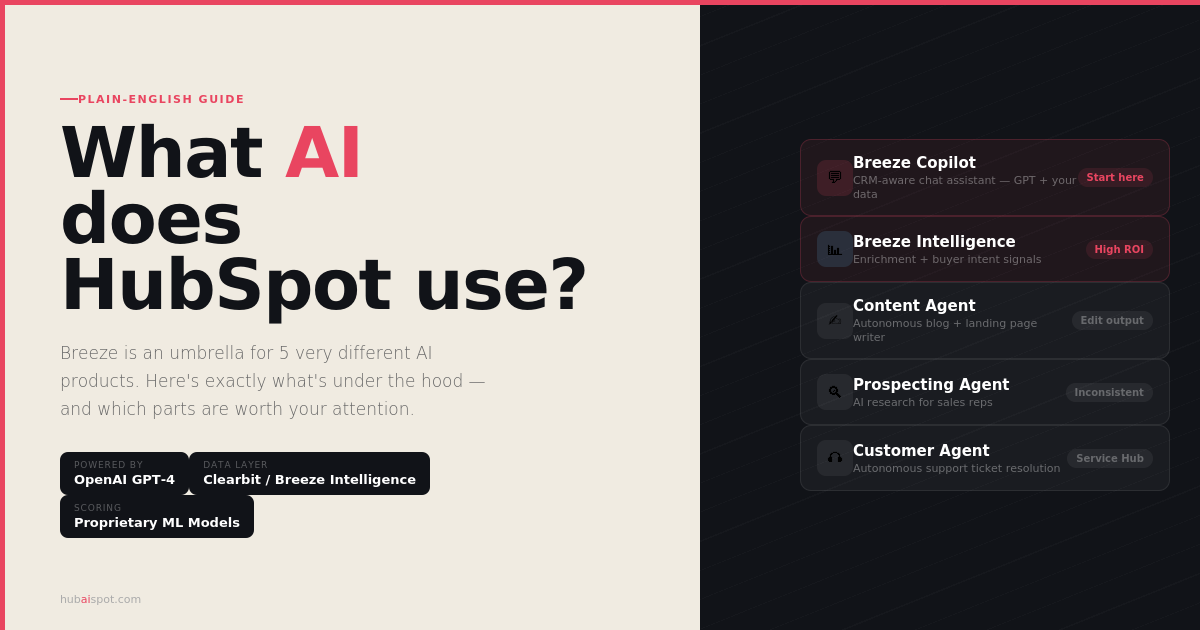
If you’ve searched “what AI does HubSpot use” and landed somewhere that just says “Breeze AI!” and moves on — you’re not alone, and that answer isn’t useful.
Breeze is an umbrella brand name that HubSpot uses to describe at least five meaningfully different AI products, built on different technology, doing different things, available at different pricing tiers. Calling them all “Breeze AI” is a bit like calling every tool in a toolbox a “hammer.”
This guide breaks down exactly what’s under the hood — what each AI component actually does, what technology it’s built on, and whether it’s worth your attention.
The Short Answer
HubSpot’s AI is a combination of:
- Its own proprietary machine learning models trained on CRM and marketing data
- OpenAI’s GPT models (for generative text features)
- Clearbit’s data infrastructure (now absorbed as Breeze Intelligence)
- Third-party intent data providers (for buyer intent signals)
- Standard classification and prediction algorithms embedded in scoring and analytics features
HubSpot doesn’t manufacture its own foundational AI. Like most enterprise software companies, it integrates best-in-class AI providers and trains additional models on its own data. What differentiates HubSpot’s AI from just “ChatGPT with a HubSpot logo” is the CRM context — Breeze AI features have access to your contact records, deal history, email engagement data, and workflow logic in ways that a standalone AI tool doesn’t.
Now for the full breakdown.
Breeze Copilot
What it is: A conversational AI assistant embedded throughout the HubSpot interface.
What AI it uses: GPT-based large language model (HubSpot integrates OpenAI’s models for the generative layer) combined with proprietary context injection that feeds your portal data into each query.
What it actually does: Copilot sits in a sidebar across your HubSpot portal and can answer questions, run lookups, summarise records, and help with tasks using natural language. The key differentiator from standard ChatGPT is context — when you ask Copilot “what’s the status of my deal with Acme Corp?”, it doesn’t just generate a plausible answer. It pulls the actual deal record from your CRM and summarises it.
Practical use cases that work well:
- “Show me all contacts who opened last week’s email but haven’t clicked anything”
- “Summarise this contact’s last six months of activity before my call”
- “Which of my open deals have been inactive for more than two weeks?”
- “Draft a follow-up email for this contact based on their last activity”
What it’s not good at: Complex multi-conditional queries, writing tasks that require real brand voice or editorial judgment, and anything requiring data outside your HubSpot portal.
Available on: All HubSpot paid plans, with depth of features scaling with tier.
Breeze Content Agent
What it is: An autonomous AI agent that can research, outline, draft, and publish content — blog posts, landing pages, case studies, podcast summaries — with minimal human input at each step.
What AI it uses: GPT-4 class model (via OpenAI integration) with HubSpot-specific prompting and a structured workflow that moves content through research → outline → draft → publish stages.
What it actually does: You give Content Agent a topic, a target audience, and some context. It searches the web for relevant information, builds an outline, writes a draft, selects or suggests an image, and can publish directly to your HubSpot Content Hub. The whole process can be mostly automated or can involve human review at each stage.
The honest assessment: The content it produces is structurally sound but stylistically generic. It defaults to safe, averaged-out language that lacks the specific point-of-view that makes content rank and resonate. Treat the output as a first draft that needs substantive editing — not as a finished product. If you publish Content Agent output without editing, it will read like AI-generated content, because it is.
Where it adds real value: High-volume content operations where speed matters more than voice. Content teams producing 20+ pieces a month can use it to eliminate the blank-page problem and compress drafting time, then edit for quality. For a site publishing two pieces a week with a strong editorial voice, it adds less value.
Available on: Marketing Hub Professional and above. Requires Content Hub add-on for some features.
Breeze Social Agent
What it is: An AI agent that repurposes your existing content into social media posts for LinkedIn, Instagram, Facebook, and X.
What AI it uses: GPT-based generative model with platform-specific formatting rules.
What it actually does: You point it at a blog post, video, or landing page. It extracts key points and generates social posts in formats appropriate to each platform — character limits, hashtag conventions, caption styles.
The honest assessment: This is the weakest component in the Breeze suite. The output follows a predictable template: extract the main point, add two or three supporting bullets, append hashtags. The hooks — the opening lines that stop scrolling — are consistently weak. LinkedIn posts especially need a first line that creates pattern interruption; Social Agent defaults to starting with the topic name or a summary statement, which is exactly what you shouldn’t do.
For high-quality brand social content, a custom ChatGPT prompt with your voice and examples will consistently outperform Social Agent. Use Social Agent for volume when you need it — content for secondary channels, scheduling filler, low-stakes posts. Don’t use it for your primary LinkedIn presence if building authority is a goal.
Available on: Marketing Hub Professional and above.
Breeze Prospecting Agent
What it is: An AI sales agent that researches prospect companies, identifies relevant context, and generates personalised outreach recommendations for sales reps.
What AI it uses: A combination of web search, Breeze Intelligence data, and GPT-based text generation.
What it actually does: When a rep is about to contact a new lead, Prospecting Agent can pull together: recent company news, the company’s likely pain points based on their industry and size, the contact’s LinkedIn activity if available, and a suggested opening message personalised to that context.
The honest assessment: Inconsistent, but improving. For well-documented companies with strong digital footprints — funded startups, publicly traded companies, businesses with active PR — the research quality is genuinely useful. For smaller businesses, niche industries, or companies with limited online presence, the research is thin and the personalisation suggestions become generic.
The output also needs editing before use in real outreach. A sales rep who sends a Prospecting Agent recommendation verbatim will produce a message that reads as obviously AI-generated — which is worse than no personalisation at all. The right use is as a research accelerator that cuts prep time from 15 minutes to 5, not as a one-click outreach machine.
Available on: Sales Hub Professional and above.
Breeze Customer Agent
What it is: An AI customer service agent that can resolve support tickets, answer questions, and escalate to human agents when needed.
What AI it uses: GPT-based model trained on your knowledge base content, past ticket resolutions, and product documentation.
What it actually does: Integrates with your HubSpot Service Hub to handle inbound support conversations autonomously. It learns from your knowledge base articles and previous ticket history, then applies that knowledge to answer new inquiries. When it can’t resolve something, it escalates with context rather than just handing off a cold ticket.
HubSpot claims Customer Agent can resolve over 65% of customer inquiries automatically. The actual percentage depends heavily on how well-developed your knowledge base is and how standardised your support requests are. Businesses with predictable, repeatable support questions (SaaS products, e-commerce) see higher automation rates. Businesses with complex, bespoke support needs see lower rates.
Where it adds real value: After-hours support coverage, first-response time reduction, and handling high-volume simple requests so human agents can focus on complex issues.
Available on: Service Hub Professional and above.
Breeze Intelligence
What it is: HubSpot’s data enrichment and buyer intent layer — the former Clearbit, acquired by HubSpot in 2023 and rebranded.
What AI it uses: Proprietary data models trained on company and contact data from hundreds of millions of records, plus a third-party intent data network that tracks content consumption across the web.
What it actually does: Two distinct things:
Enrichment: Automatically populates missing contact and company properties — job title, company size, industry, tech stack, LinkedIn URL, annual revenue — as new contacts enter your portal. This removes the manual data entry that degrades CRM quality over time.
Buyer Intent: Identifies companies that are actively researching topics related to your product or category, even before they’ve visited your site or filled out a form. These intent signals are derived from tracking content consumption patterns across trade publications, review sites, and industry content.
Why it matters more than most people realise: Buyer intent is the most strategically valuable AI feature in the entire HubSpot suite for B2B teams doing outbound. The ability to identify companies who are in-market right now — before they’ve raised their hand — changes the economics of outbound prospecting. Intent-triggered outreach dramatically outperforms cold-volume outreach on response rates.
Available on: Breeze Intelligence credits are included at certain volumes on Enterprise plans and available as add-ons on Professional. Enrichment and Intent are priced separately.
The AI Features Embedded Across the Platform
Beyond the named Breeze components, HubSpot has woven AI into specific features throughout Marketing Hub, Sales Hub, and Content Hub:
Content Assistant — AI writing assistance embedded in the email editor, landing page builder, blog editor, and social post composer. Generates copy, rewrites sections, suggests subject lines, and adjusts tone on request. Available on Starter and above. This is the AI feature most HubSpot users interact with first.
Smart Send Time — Analyses each contact’s historical email engagement patterns and schedules delivery at the optimal time for that individual, rather than sending to the whole list at once. Available on Marketing Hub Professional.
AI Lead Scoring — Machine learning model that analyses your closed-won deal data to predict which new contacts are most likely to convert. Produces separate Fit and Engagement scores. Available on Marketing Hub Professional.
AI Blog Writer — Generates full blog post outlines and drafts based on a topic input. Similar to Breeze Content Agent but simpler — no autonomous multi-step workflow, just direct content generation within the blog editor. Available on Content Hub.
Workflow AI Suggestions — Analyses your existing HubSpot workflows and suggests additional branches, conditions, or optimisations based on contact behaviour patterns. Available on Marketing Hub Professional.
Conversation Intelligence — Records and transcribes sales calls made through HubSpot, then uses AI to extract key themes, sentiment, competitor mentions, and follow-up actions. Available on Sales Hub Professional.
How HubSpot’s AI Compares to Building Your Own AI Stack
A common question from technically sophisticated HubSpot users: why use Breeze AI when you could connect ChatGPT or Claude directly to HubSpot via the API and build exactly what you need?
The honest answer: you can, and for specific use cases, custom integrations beat native Breeze features on output quality and flexibility. The Breeze vs ChatGPT comparison we ran across four marketing tasks showed ChatGPT outperforming Breeze on cold email, ad copy, and blog outlines.
But Breeze wins on integration depth and zero-friction deployment. A custom ChatGPT integration requires API setup, prompt engineering, data mapping, and maintenance. Breeze features are live in your portal in minutes with no technical setup. For teams without a developer or a dedicated marketing ops person, Breeze’s convenience advantage is real.
The pragmatic answer most teams land on: use Breeze for contextual, CRM-connected tasks where the native data access matters. Use ChatGPT or Claude for creative, high-quality-ceiling tasks where prompt control produces better output. Build custom integrations for specific workflows where neither handles it well natively.
Which HubSpot AI Features Should You Actually Turn On?
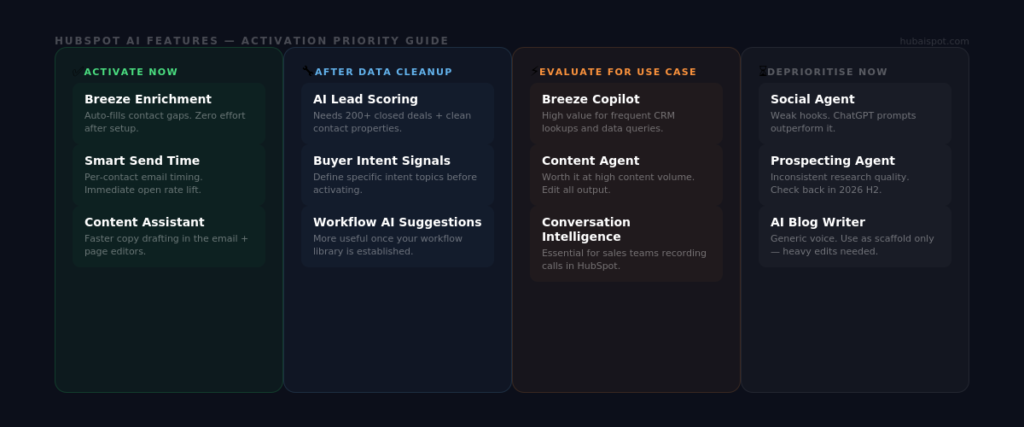
If you’re looking for a prioritised activation list rather than a full technical breakdown, here’s the practical order:
Activate immediately if on your plan:
- Breeze Intelligence enrichment (fills contact gaps automatically)
- Smart Send Time (improves open rates with zero ongoing effort)
- Content Assistant (faster email and page copy drafting)
Activate once your data is clean:
- AI Lead Scoring (requires 200+ closed deals and clean contact properties)
- Buyer Intent signals (requires defining your specific intent topics carefully)
Evaluate for your use case:
- Breeze Copilot (high value for teams that do frequent CRM lookups and data queries)
- Conversation Intelligence (high value for sales teams making recorded calls through HubSpot)
- Breeze Content Agent (value depends on your content volume and quality bar)
Deprioritise for now:
- Social Agent (weaker output than alternative approaches)
- Prospecting Agent (inconsistent research quality, needs significant improvement)
For the full 30-day honest review of Breeze AI in real marketing conditions, see Is HubSpot Breeze AI Actually Worth It? An Honest Review. For a direct comparison of Breeze AI versus ChatGPT on specific marketing tasks, see HubSpot Breeze AI vs ChatGPT: Which One Actually Wins for Marketing Copy?
Leave a Reply