

This isn’t a post about whether HubSpot’s AI features are good. They are, increasingly. This is a post about something more immediately practical: the billing change that went live when HubSpot launched Agent Hub in July 2026, and the credit consumption that has caught a lot of teams off guard since then.
If you used Breeze Studio agents during the beta period, they were free. Breeze Studio is gone now. Agent Hub replaced it. And agents in Agent Hub consume HubSpot Credits.
That change happened with less fanfare than it deserved.
What Agent Hub Is and What It Replaced
Breeze Studio launched as a beta product that let teams build and run custom AI agents inside HubSpot. During beta, usage was free. HubSpot was collecting data, improving the product, and letting teams get comfortable with what agents could do.
In July 2026, Breeze Studio was deprecated and replaced by Agent Hub. The functionality is similar in concept but more mature. Agent Hub is a centralized dashboard where you can see every agent running in your portal, monitor their performance, build new ones with Agent Builder, and manage permissions.
What changed alongside the rebranding was pricing. The free beta period ended. Agents that were free to run now consume credits.
This is a reasonable business decision by HubSpot. Running AI agents at scale has real compute costs. But the transition caught teams that had built agent-based workflows during the beta period, because those workflows kept running and started consuming credits without anyone explicitly approving the billing change.
What HubSpot Credits Are and How They Work
HubSpot Credits are the currency that AI features consume when they execute tasks. Think of them as compute tokens with a dollar value attached.
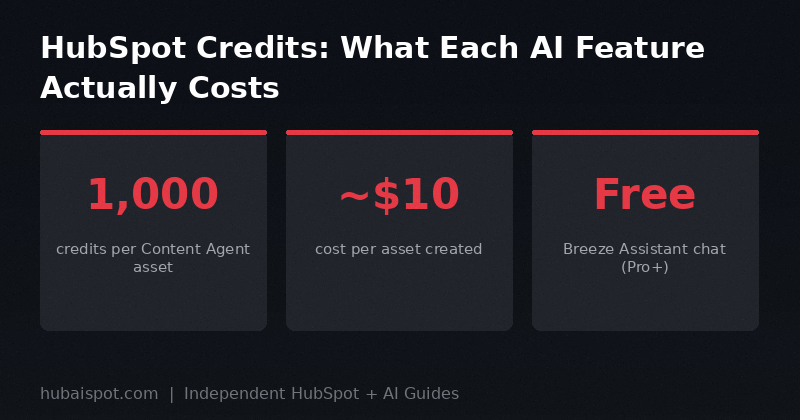
The current exchange rate is approximately $0.01 per credit — so 1,000 credits equals roughly $10. HubSpot doesn’t advertise this conversion prominently, which is part of why credit consumption surprises people.
Credits are allocated as part of your HubSpot subscription. The amount you get depends on your tier:
- Starter: Limited credits, primarily for generative AI features like email subject line suggestions and basic content drafting
- Professional: More credits included, enough for moderate AI usage across the hub features
- Enterprise: Largest included allotment, with the ability to purchase additional credits as needed
When you run out of included credits, AI features either stop working or you’re prompted to purchase more depending on how your admin has configured AI settings. By default, some portals will auto-charge for additional credits, which is how teams end up with unexpected bills.
What Consumes Credits
Not everything in HubSpot’s AI feature set consumes credits at the same rate. Here’s the breakdown that matters:
High credit consumption — plan for these:
- Content Agent: 1,000 credits per asset generated. A landing page, an email, a blog post — each one costs 1,000 credits. At current pricing, that’s $10 per piece of AI-generated content.
- Recommended LinkedIn post topics: 1,000 credits per AI-recommended topic. The base LinkedIn post generation doesn’t cost extra, but pulling from AI-recommended topics does.
- Agent runs (custom agents): Variable, depending on complexity and the number of steps in the agent workflow. Simple agents cost less; agents that make multiple API calls to third-party connectors cost more.
Low or no additional credit consumption:
- Breeze Assistant chat: The conversational interface for Breeze Assistant is included without separate credit charges at Professional and Enterprise tiers. You can ask questions, get analysis, and review suggestions without burning credits.
- CRM field suggestions: Basic AI suggestions for contact and deal properties don’t consume credits separately.
- Email subject line suggestions: Included in Marketing Hub without additional credit charges.
- AI workflow audit: The health scoring feature for your automation workflows is included without credits charges.
The grey area — check your settings:
- Breeze prospecting suggestions: Some prospecting agent features consume credits; others don’t. The specifics depend on whether the feature is pulling from Breeze Intelligence data enrichment, which has its own credit consumption model.
- Breeze Intelligence data enrichment: This is separate from agent usage and has its own credit model. Company and contact enrichment from Breeze Intelligence pulls from a different credit pool that depletes based on enrichment volume.
How to Check Your Credit Balance and Usage
You can find your credit balance inside HubSpot under Settings > AI Settings > Usage. This shows your total monthly allotment, how much has been consumed, and a breakdown by feature.
The usage breakdown is useful for identifying where credits are going. If you see a large chunk going to Content Agent, you can investigate who ran it and what was generated. If you see credits depleting on enrichment, you can trace it to specific enrichment workflows.
HubSpot also allows you to set credit limits per user or team. This is in Settings > AI Settings > Permissions. If you have a team member who’s experimenting heavily with Content Agent, you can cap how many credits they can consume per month before requiring admin approval for more.
Setting these limits should be one of the first things a Super Admin does when enabling Agent Hub for a team.
The Breeze Intelligence Problem
Breeze Intelligence is worth calling out separately because it has the most potential for unexpectedly high credit consumption.
Breeze Intelligence is HubSpot’s data enrichment product — it fills in company and contact records with firmographic data, buying intent signals, and contact details pulled from a third-party data network. It launched as part of the Breeze suite and has a genuinely useful application for teams that need to enrich inbound leads or build outbound lists.
The problem is that enrichment workflows can run continuously in the background and consume credits without triggering obvious notifications. If you’ve set up an automation that enriches every new contact on creation, and your inbound volume spikes, your credits can deplete significantly before you notice.
The fix is to set explicit triggers and conditions on enrichment workflows. Don’t enrich every contact — enrich contacts that meet specific criteria (job title includes “VP” or higher, company size above 200 employees, etc.). This keeps enrichment focused and prevents background processes from burning your monthly allotment on low-value records.
We covered Breeze Intelligence in more depth in our comparison of Breeze Intelligence vs ZoomInfo — the context there is also relevant to understanding what you’re paying for when enrichment credits run.
Agent Hub vs What You Built in Breeze Studio
If you built custom agents during the Breeze Studio beta, you need to do a few things:
First, audit what’s still running. Go to Agent Hub and check the Active Agents tab. You’ll see every agent that’s currently enabled, including ones inherited from Breeze Studio. Some teams have found agents they’d forgotten about still running and consuming credits.
Second, check the migration status. Not everything from Breeze Studio migrated cleanly to Agent Hub. Some custom agents that relied on early beta features may have broken in the migration. Agent Hub will show a warning indicator on agents that have errors in their configuration.
Third, review your legacy workflows. If you built automation workflows that included Breeze Studio actions, check whether those actions still work as expected. Some workflow actions that used the old Breeze Studio API have been deprecated and replaced with Agent Hub equivalents.
Agent Builder, which is now inside Agent Hub, is more capable than what Breeze Studio offered. You can build more sophisticated multi-step agents, connect to third-party tools through the new connector library, and use Context Home data to give agents more relevant business context. But the migration isn’t automatic — you’ll need to rebuild more complex agents using the new Agent Builder.
What the Billing Surprise Actually Cost Teams
The most common scenario I’ve seen reported is teams using Content Agent at scale for the first time and not realizing the per-asset cost.
Example: a marketing team decides to use Content Agent to draft 20 nurture emails for a new campaign. That’s 20,000 credits, or approximately $200 in credit consumption. For a team that expected AI drafting to be included in their existing subscription, that’s an unexpected line item.
This isn’t a reason to avoid Content Agent — $200 for 20 email first drafts is reasonable if the quality is there. But it should be a planned expense, not a surprise on the next invoice.
The way to avoid this is simple: before using any agent feature at scale, check the credit cost per action in AI Settings, estimate your total consumption, and verify your current credit balance against your planned usage. For Content Agent specifically, run a single test asset first to confirm the output quality meets your standards before committing the credits to a full batch.
How This Changes the HubSpot vs. Standalone AI Tools Calculation
Before credits-based billing, the argument for using HubSpot’s AI features over tools like ChatGPT or Jasper was straightforward: they’re built in, they use your CRM context, and they don’t cost extra.
That third point is now more nuanced. For moderate AI usage, HubSpot’s included credits cover most needs. For teams using Content Agent aggressively or running high-volume enrichment, the credit costs can exceed what you’d pay for a standalone tool.
The context advantage is still real. HubSpot AI features know your CRM data, your audience segments, and your past campaign performance. A standalone tool doesn’t. But the cost calculation now requires comparing credit costs against the pricing of alternatives rather than assuming HubSpot is automatically cheaper.
For a direct comparison of what you get from HubSpot’s AI versus external tools for content generation, the Jasper vs HubSpot Content Assistant breakdown is worth reading alongside this post.
Recommendations Before You Roll Out Agent Hub to Your Team
Set credit limits immediately. Before enabling Content Agent or any high-consumption feature for your team, go to AI Settings > Permissions and set per-user monthly credit caps. Start conservatively and increase as you understand actual consumption patterns.
Audit any enrichment automations. If you have workflows that trigger Breeze Intelligence enrichment, check that they have conditions limiting enrichment to high-value records only.
Tell your team what costs credits. Brief whoever manages HubSpot — and whoever is going to use Content Agent or run agents — on what consumes credits and at what rate. A five-minute walkthrough prevents billing surprises.
Check the auto-replenish settings. In your billing settings, you can control whether HubSpot automatically purchases additional credits when your balance runs out. If auto-replenish is on and you haven’t set a limit, you can end up with charges you didn’t explicitly approve. Turn it off or set a hard cap.
Start with Breeze Assistant chat, not Content Agent. The conversational Breeze Assistant doesn’t consume heavy credits. Use it to explore what’s possible, validate that your Context Home data is producing good outputs, and understand the platform before moving to the credit-intensive agent features.
Agent Hub is a genuine product improvement over Breeze Studio. The centralized management, the better agent debugging tools, the connector library — all of it is better than what the beta offered. But it’s not free, and the billing model needs to be managed actively rather than discovered reactively.
HubAISpot covers independent, practical guides on HubSpot and AI for marketers and sales teams. No vendor relationships. No paid placements.
Leave a Reply